


Every appraisal firm sits on a goldmine of automatable tasks that nobody touches because of one paralyzing fear: what if the state board flags it during an audit?
Appraisers are spending two to three hours a day on administrative work that software could handle in minutes. Report formatting, data entry from MLS sheets, scheduling confirmations, invoice generation – the list is longer than most owners want to admit. Meanwhile, leaner competitors are moving faster with the same headcount.
The disconnect happens because appraisal automation compliance feels like navigating a minefield. Most firms either automate nothing (playing it too safe) or automate everything without thinking it through. Neither works.
What does work is building an automation inventory with proper compliance guardrails – a defensible playbook that auditors can actually follow. Not theoretical frameworks or vague guidelines, but specific task inventories with their required logging mechanisms, evidence trails, and approval gates already mapped out.
The automatable vs. untouchable divide
Understanding what you can and cannot automate starts with recognizing the regulatory bright lines. USPAP doesn't prohibit automation – it prohibits undermining appraiser independence and judgment.
-
Value conclusions
-
Comparable selection rationale
-
Condition ratings
-
Market analysis interpretations
-
Adjustment determinations
Everything else is fair game, provided you maintain proper documentation.
The administrative layer is your biggest opportunity. Invoice generation alone eats around 15 minutes per report – a purely mechanical task. MLS data transfer, where appraisers manually copy property details into report forms, contains zero judgment calls yet burns hours every week.
Data gathering and verification fit the automatable category too. Pulling public records, downloading flood maps, retrieving census data – these involve finding information, not interpreting it. The appraiser still analyzes the data; automation just delivers it faster.
Communication workflows get overlooked more often than you'd expect. Appointment scheduling, status updates to lenders, document collection from homeowners – these follow predictable patterns that software handles well.
The core distinction: automation handles the mechanical work while preserving every decision point for the appraiser. That separation is your compliance foundation.
Building your compliance infrastructure
Defensible automation requires three components working together: comprehensive logging, evidence preservation, and approval checkpoints.
Manage every appraisal with confidence and clarity.
Rateoly helps you coordinate inspections, generate reports, and communicate seamlessly with clients.
- Comprehensive appraisal tracking
- Automated client notifications
- Integrated scheduling & report management
No credit card required
Your logging system needs to capture every automated action with timestamp precision. When software pulls tax records for a property, the log should show:
-
Exact retrieval time
-
Data source accessed
-
Specific records pulled
-
Any data transformations applied
-
User who initiated the process
That granular detail turns automation from a black box into a transparent workflow auditors can trace step by step.
Evidence preservation goes beyond simple logging. Every piece of source data gets archived in its original format. If your system pulls comparable sales from MLS, you preserve both the raw export and any formatted versions. This dual preservation proves no data manipulation occurred during automation.
Approval gates create human checkpoints at critical junctures. Before automated emails go to clients, they queue for appraiser review. Before data imports into reports, they display for verification. These gates maintain appraiser control while still capturing the efficiency gains.
The diagram below shows the flow between logging, evidence preservation, and approval gates.
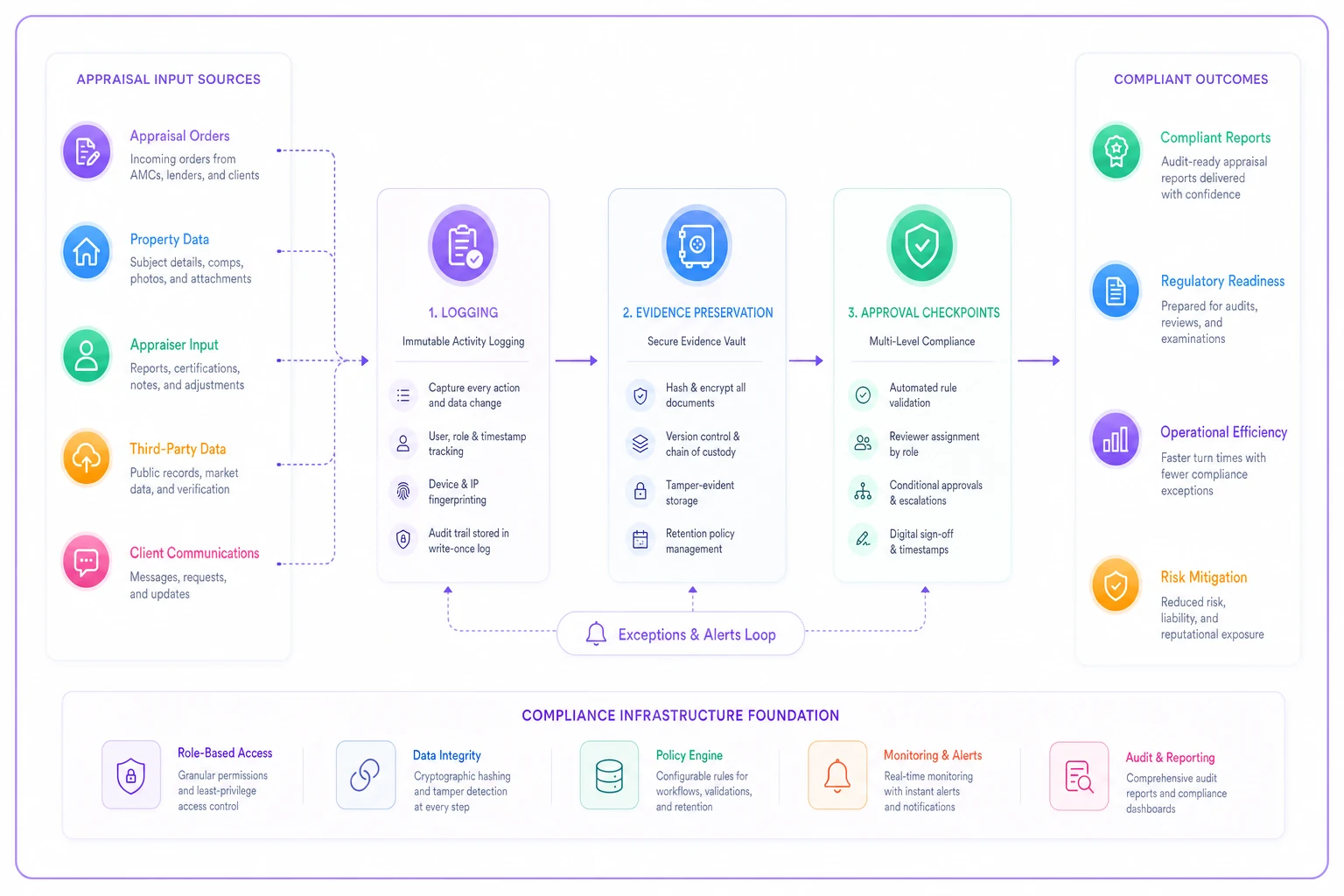
This workflow maps how automated actions become auditable records without removing appraiser control.
Consider how this works for preliminary research. Your automation pulls:
-
Property tax records
-
Prior sales history
-
Neighborhood demographics
-
School district boundaries
-
Flood zone designation
Each data point gets logged with its source URL and retrieval timestamp. Original documents get stored in a compliance folder. The appraiser reviews everything before incorporating it into their analysis. Total time saved: roughly 45 minutes. Compliance risk: zero.
The task inventory playbook
Below is a starter inventory of automatable tasks with their specific compliance requirements:
MLS Data Import
-
Automation scope
Transfer listing details into report templates
-
Required logging
Source MLS number, import timestamp, fields transferred
-
Evidence trail
Original MLS printout/PDF archived
-
Approval gate
Appraiser verifies accuracy before report generation
-
Audit defense
"We automated data transfer, not data selection or interpretation"
Public Records Retrieval
-
Automation scope
Download tax cards, deed records, permit history
-
Required logging
Each document source, retrieval date, document version
-
Evidence trail
Original PDFs from county sites preserved
-
Approval gate
Appraiser reviews before using in analysis
-
Audit defense
"Automation replaces manual downloading, not professional judgment"
Appointment Scheduling
-
Automation scope
Email/text coordination with homeowners
-
Required logging
All communication timestamps and responses
-
Evidence trail
Complete message thread archived
-
Approval gate
Appraiser sets available windows; system handles logistics
-
Audit defense
"Administrative coordination only; no valuation aspects involved"
Report Assembly
-
Automation scope
Compile sections, format pages, insert standard language
-
Required logging
Template versions used, assembly sequence
-
Evidence trail
Individual report components preserved pre-assembly
-
Approval gate
Appraiser reviews complete draft before finalization
-
Audit defense
"Formatting and organization only; all content appraiser-generated"
Invoice Generation
-
Automation scope
Create bills from completed report data
-
Required logging
Fee calculations, client details, generation timestamp
-
Evidence trail
Report completion trigger, fee schedule applied
-
Approval gate
Optional review before sending
-
Audit defense
"Pure accounting function; no appraisal work involved"
Comparable Photo Management
-
Automation scope
Organize, resize, and insert photos into reports
-
Required logging
Photo sources, modification timestamps, placement locations
-
Evidence trail
Original full-resolution images preserved
-
Approval gate
Appraiser selects which photos to include
-
Audit defense
"Technical photo processing; selection remains manual"
Audit defense: "Technical photo processing; selection remains manual"
The right implementation sequence
Rolling out automation requires careful sequencing. Start with the least controversial tasks – the ones furthest from actual valuation work.
Phase 1 targets pure administration. Invoice generation, appointment reminders, document organization. These tasks carry zero USPAP implications. Build your logging and evidence systems here while the stakes are low. Get comfortable with the compliance infrastructure before moving anywhere near data handling.
Phase 2 introduces data retrieval automation. Public records, MLS downloads, map generation. You're still far from valuation territory, but now you're handling source materials, so logging becomes more detailed and evidence preservation more critical.
Phase 3 tackles report assembly and formatting. This feels closer to the actual appraisal product, which means compliance guardrails need to be airtight. Every automated formatting decision gets logged. Every template component gets preserved. The appraiser maintains complete visibility into how their report comes together.
Phase 4 addresses communication automation. Status updates, clarification requests, delivery confirmations. Not valuation-related, but these touch clients directly, so approval gates matter here.
| Phase | Focus Area | USPAP Risk Level | Logging Depth | Approval Gates Required |
|---|---|---|---|---|
| 1 | Administration | None | Basic | Optional |
| 2 | Data Retrieval | Low | Detailed | Yes – before analysis |
| 3 | Report Assembly | Medium | Comprehensive | Yes – before finalization |
| 4 | Communication | Low | Moderate | Yes – before client contact |
Starting with Phase 1 isn't just about reducing risk – it's about building the muscle memory your team needs before automation touches anything that matters.
Each phase builds on the previous one's infrastructure. By the time you reach more complex automation, your compliance framework has already been tested on simpler tasks.
Sample automation playbooks for auditors
When auditors review your operations, they need to understand exactly how automation preserves appraisal independence. These playbooks show compliance in action.
Playbook: Automated Comp Photo Processing
-
System creates timestamped backup of original photos
-
Photos get resized to report specifications
-
EXIF data extracted and logged (date, location if available)
-
Images renamed using standardized convention
-
Optimized versions created for digital delivery
Compliance checkpoints:
-
Original photos preserved unchanged
-
All modifications logged with timestamps
-
Appraiser selects which photos to include (judgment preserved)
-
Processing parameters documented in report metadata
Audit trail shows: Appraiser chose comparables and took photos (judgment). System handled technical processing (mechanical).
Playbook: Public Records Research Package
-
Query county assessor database for tax records
-
Pull building permits from last 10 years
-
Retrieve deed history from recorder's office
-
Download flood maps from FEMA
-
Compile into research folder
Compliance checkpoints:
-
Each query logged with timestamp and parameters
-
Source URLs recorded for every document
-
Original formats preserved (PDF, HTML, images)
-
Appraiser reviews before using any data
-
No interpretation or analysis performed
Audit trail shows: System gathered publicly available documents (mechanical). Appraiser analyzed relevance and reliability (judgment).
Playbook: Client Communication Sequence
-
Generate delivery email from template
-
Attach report files (with appraiser pre-approval)
-
Queue for final appraiser review
-
Send upon approval
-
Log delivery confirmation
Compliance checkpoints:
-
Email content follows pre-approved templates
-
Appraiser reviews before sending
-
Complete communication thread archived
-
Delivery tracking maintains chain of custody
-
Client responses routed to appraiser immediately
Audit trail shows: Administrative communication handled systematically while preserving appraiser control over content and timing.
Operational reality check
The gap between theoretical automation and practical implementation often surprises firms. Some tasks that look automatable turn out to involve too many judgment calls to be worth it. Others that seemed complex follow consistent enough patterns that software handles them without issue.
Data quality ends up being the biggest variable. Public records databases have inconsistencies. MLS fields get populated differently depending on who entered them. Your automation needs to handle these variations gracefully – flagging anomalies for human review rather than making assumptions and moving on.
Staff adaptation takes longer than expected too. Appraisers comfortable with their manual workflows need time to trust automated processes. Starting with obvious wins, like eliminating duplicate data entry, builds the confidence needed for broader adoption.
Compliance comfort grows gradually. The first audit after implementing automation feels nerve-wracking. But when auditors see comprehensive logs and preserved evidence, they typically recognize that you've actually improved documentation compared to what manual processes produced. That's not a small thing – it changes how auditors interpret your operation.
The time savings compound over months. That 15-minute invoice generation task seems minor until you multiply it by 20 reports monthly. An hour saved on research per assignment becomes 200+ hours annually. These gains add up faster than most owners expect.
Technology infrastructure essentials
Your automation platform needs specific capabilities to hold up under compliance scrutiny. Not every tool marketed toward appraisal firms includes the necessary guardrails.
Immutable logging is the first requirement. Every automated action must create an unchangeable record – timestamps, action details, data sources – all preserved in a format that prevents after-the-fact modifications. This is what protects you during audits.
Version control for templates and workflows matters more than most firms initially realize. When automation uses a report template or follows a workflow, you need to know exactly which version was active at the time. Changes to automation rules should be tracked with the same rigor as changes to appraisal methodology.
Role-based permissions prevent unauthorized automation changes. Only designated administrators should be able to modify automation workflows. Appraisers can trigger automated tasks but shouldn't be able to alter their parameters. That separation maintains control while enabling efficiency.
Integration capabilities determine your automation scope. Your platform needs to connect with MLS systems, public records databases, client portals, and accounting software – and each integration should maintain its own audit trail showing data flowing between systems transparently.
Use append-only or WORM-backed storage for logs to simplify audit verification.
These technical foundations support the operational gains that make automation worthwhile. When properly implemented, automated workflows don't just save time – they improve consistency, reduce errors, and create better documentation than manual processes typically produce.
Making the business case
The numbers get compelling once you account for both time savings and risk reduction. A typical residential appraiser completes somewhere around 200 reports annually. If automation saves two hours per report through eliminated administrative work, that's roughly 400 hours – around 10 full work weeks – freed up for billable activities.
At standard appraisal rates, those hours represent meaningful additional capacity. Either you handle more assignments with the same staff, or you improve work-life balance without cutting income. Most firms end up finding some combination of both.
Beyond time, automation reduces costly errors. Manual data entry introduces typos. Missed emails frustrate clients. Inconsistent formatting triggers revision requests. Eliminating these friction points improves both efficiency and client satisfaction in ways that don't always show up in time-savings calculations.
The compliance benefits can justify automation on their own. Detailed logs and evidence trails don't just satisfy auditors – they protect you in disputes. When a client questions your process or the state board investigates a complaint, your audit trail demonstrates systematic compliance rather than leaving you scrambling to reconstruct what happened.
The path forward
Building compliant automation in your appraisal firm doesn't require a full operational overhaul. Start with one simple task – invoice generation or appointment scheduling. Build your logging system around it. Create your evidence preservation process. Establish your approval gates.
Once that first task runs smoothly, add another. Then another. Within six months, you'll have a comprehensive automation inventory that meaningfully changes how your firm operates, without creating compliance headaches.
Firms that take this approach seriously gain real advantages. They deliver reports faster without sacrificing quality. They handle more volume without adding headcount. They document everything without drowning in manual paperwork.
More importantly, they free their appraisers to focus on what actually requires professional judgment – analyzing markets, selecting comparables, determining adjustments, reaching value conclusions. The mechanical work gets handled mechanically. The professional work stays in professional hands.
The question isn't whether to automate. It's how to do it without creating problems you can't explain to a state board. With the right inventory, proper guardrails, and clear playbooks, automation stops being a compliance risk and starts being a competitive advantage. Compliance built in from the start – not bolted on as an afterthought – is the only version that actually holds up.
Building compliant automation in your appraisal firm doesn't require a full operational overhaul. Start with one simple task – invoice generation or appointment scheduling. Build your logging system around it. Create your evidence preservation process. Establish your approval gates.
Ready to elevate your appraisal operations?
Join 500+ appraisal firms using Rateoly to enhance accuracy, save time, and improve client satisfaction.