


Most appraisal firms run their file security like a shared computer at a library — everyone has access to everything, passwords get written on sticky notes, and when something goes missing, nobody knows who touched what or when. I'm not talking about sophisticated cyber threats here. I'm talking about the everyday security disasters that happen when a trainee accidentally overwrites final reports, when ex-employees still have access three months after leaving, or when you can't prove to a state board investigator who approved a controversial value adjustment.
The real damage happens quietly. A junior appraiser deletes comp photos from a completed report. Someone changes adjustment values in a finalized appraisal. Files get shared with the wrong lender. These aren't malicious attacks — they're operational failures that happen when small firms treat file security as an afterthought.
What makes this particularly painful is that appraisal files contain sensitive financial data, personally identifiable information, and professional opinions that could end up in court. Yet most firms manage these files with less security than their Netflix account.
Why traditional IT security doesn't work for small appraisal shops
The standard enterprise security playbook falls apart when you're running a five-person firm. You don't have a dedicated IT person. Your "server" might be a shared Dropbox folder. Your team includes part-time trainees, contracted reviewers, and that semi-retired appraiser who only does rural properties twice a month.
Traditional security frameworks assume you have departments, formal hierarchies, and people whose job includes managing permissions. In reality, your office manager is also your compliance person, your senior appraiser handles tech issues between inspections, and everyone needs different levels of access depending on what fire you're fighting that day.
A single appraisal file moves through multiple hands — field appraiser, data entry assistant, reviewer, quality control, admin for delivery. Each person needs specific access at specific times. Give everyone full access and you're asking for trouble. Lock things down too tight and work grinds to a halt.
What typically happens is firms default to one of two extremes: either everyone gets admin access because it's easier than managing permissions, or they implement such restrictive controls that appraisers waste hours waiting for someone to unlock files they need. Neither works.
Building role-based access that actually matches appraisal workflows
The secret to functional appraisal file security isn't complicated technology — it's mapping your actual workflow and creating access patterns that match how work really flows through your office.
Manage every appraisal with confidence and clarity.
Rateoly helps you coordinate inspections, generate reports, and communicate seamlessly with clients.
- Comprehensive appraisal tracking
- Automated client notifications
- Integrated scheduling & report management
No credit card required
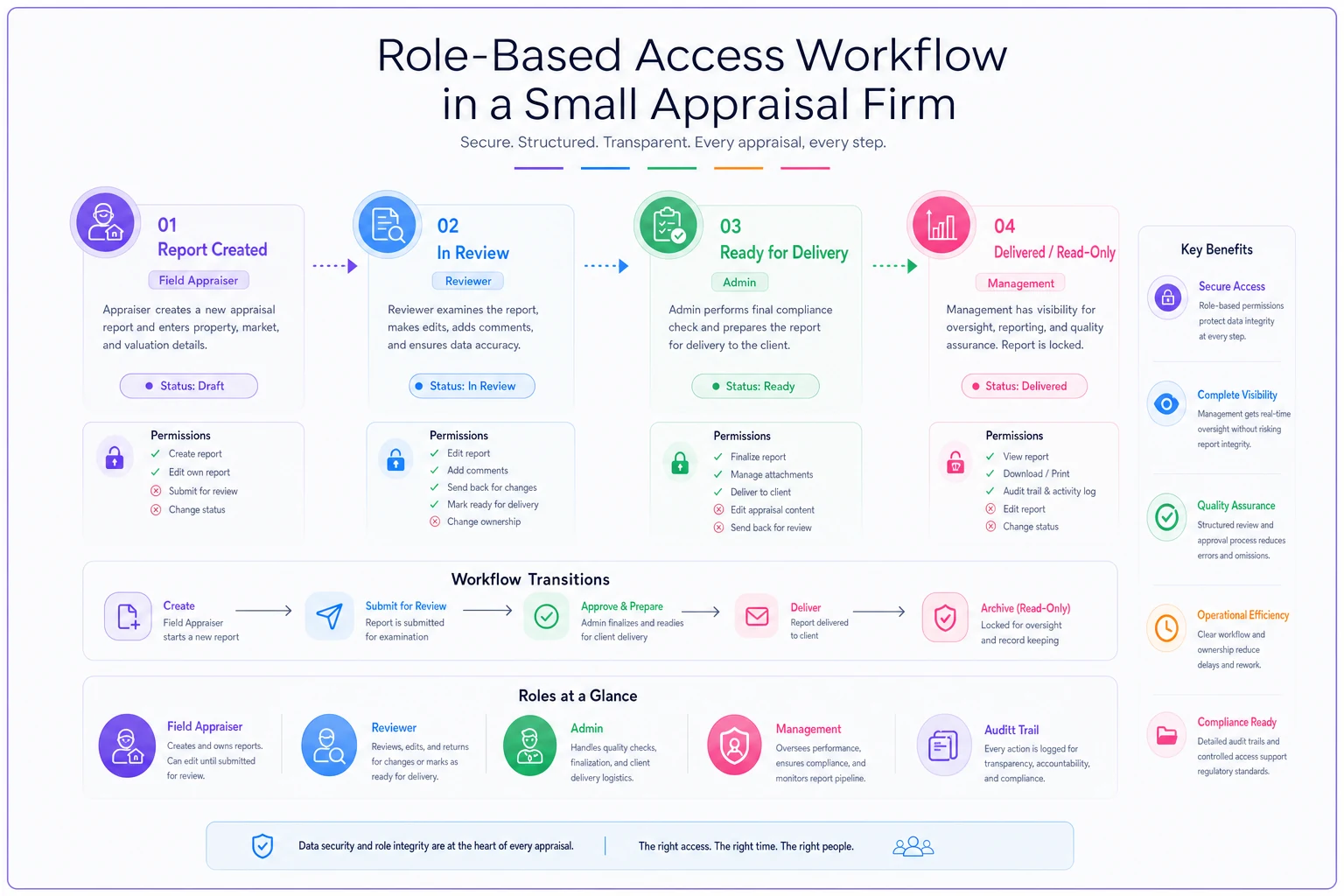
Start with four basic role categories that cover 90% of small firm needs:
Field Appraisers need to create new files, upload photos and data, edit their assigned reports, and read completed reports for comp research. They shouldn't be able to modify other appraisers' work-in-progress files or change anything after final delivery.
Reviewers need read access to everything, edit access to reports under review, and the ability to add review comments without altering the original appraiser's work. They need to see version history but shouldn't delete files.
Administrative Staff need to manage file delivery, handle client communications, and process invoices. They need read access to completed files, limited edit access for corrections, and full access to delivery logs and client folders.
Management/Owners need oversight access to everything, the ability to reassign work, override permissions when needed, and access to all audit trails and logs.
The trick is these roles aren't always tied to people — they're tied to workflow stages. Your senior appraiser might wear the "Field Appraiser" hat when doing their own reports, the "Reviewer" hat when checking junior work, and the "Management" hat when handling escalated issues.
Here's how this maps to actual folder structures:
| Path |
|---|
| /Active Reports/ |
| ├── [Appraiser Name]/ |
| │ ├── In Progress/ (Write: assigned appraiser only) |
| │ ├── In Review/ (Write: reviewer, Read: appraiser) |
| │ └── Ready for Delivery/ (Write: admin, Read: all) |
| ├── /Delivered Reports/ (Read only for all, Write: none) |
| └── /Archive/ (Read: management, Write: none) |
This structure enforces natural boundaries. An appraiser can't accidentally edit someone else's work. Completed reports become read-only automatically. The system matches how work actually flows.
Here's a quick visual mapping of roles to workflow stages.
This structure enforces natural boundaries. An appraiser can't accidentally edit someone else's work. Completed reports become read-only automatically. The system matches how work actually flows.
Minimal encryption that protects without paralyzing operations
Encryption sounds sophisticated until you're trying to explain to your 68-year-old contract appraiser why they can't open files on their iPad. The goal isn't NSA-level security — it's protecting sensitive data from basic threats while keeping work flowing.
Focus encryption efforts on three critical points:
Data at rest: Use full-disk encryption on all computers. Modern Windows and Mac systems have this built in (BitLocker and FileVault). Turn it on. This protects you when someone's laptop gets stolen from their car.
Data in transit: Any cloud storage or file sharing service you use should have transport encryption (look for HTTPS and TLS). This is standard now — if your provider doesn't have it, switch providers.
Sensitive file encryption: For the truly sensitive stuff — financial statements, legal documents, anything with social security numbers — use file-level encryption. But only encrypt what actually needs it. Encrypting every photo and every draft report creates more problems than it solves.
The practical approach looks like this: password-protect PDF reports before sending to clients (built into Adobe). Use encrypted ZIP files for document packages with sensitive data. Keep passwords simple but unique per client — something like ClientName + PropertyZip works better than complex passwords nobody can remember.
For everyday operations, modern cloud storage handles most encryption needs automatically. Google Drive, Dropbox Business, and Microsoft OneDrive all encrypt files by default. You don't need to overthink this part — just make sure you're using business accounts, not personal ones.
Forensic logging that tells you what happened without drowning in data
When a client claims they never received that report, when a value mysteriously changes after review, or when files disappear, you need logs that tell the story. But most logging systems generate so much noise you can't find what matters.
Lightweight forensic logging means tracking five specific events:
-
File creation
Who created it, when, from what template or source
-
Major edits
Value changes, comp substitutions, photo additions/deletions
-
Status changes
Moved to review, marked complete, sent to client
-
Access events
Who opened it, when, from where — especially after delivery
-
Delivery actions
Sent to whom, when, confirmation of receipt
Here's what a useful log entry looks like:
| Log Entry |
|---|
| 2024-03-15 14:32 - Smith Property (24-0892) User: Janet Mills Action: Changed opinion of value Previous: $425,000 New: $438,000 Reason field: "Additional comp support per reviewer notes" Location: Office workstation |
Compare that to typical system logs that record every mouse click and file save. You want enough detail to reconstruct what happened, not enough to need a computer science degree to read it.
The logging system should answer three questions:
-
Who did what?
-
When did they do it?
-
Was it authorized?
Most appraisal software includes some logging, but it's often buried in system files. Create a simple spreadsheet or database that tracks the important stuff in plain language. Update it as part of the workflow — when you mark a report complete, log it. When you send to a client, log it.
The key is making logging automatic or near-automatic. Manual logs that require separate data entry don't get maintained. Look for ways to extract logs from your existing systems — email sent folders, cloud storage activity reports, software audit trails — and compile them into one place.
The incident response checklist that actually gets used
When something goes wrong — and it will — you need a response plan your team can actually execute, not a 47-page disaster recovery manual that nobody's read.
A practical incident response checklist covers four scenarios that account for most appraisal firm security incidents:
Scenario 1: Unauthorized file access or changes
Immediate actions (first hour):
-
Identify affected files through logs
-
Lock affected user accounts
-
Create backup copies of current file states
-
Document who discovered it and how
Investigation (first day):
-
Review access logs for past 30 days
-
Interview involved parties
-
Determine scope (one file or systemic?)
-
Check if client data was affected
Resolution (first week):
-
Restore correct versions from backups
-
Update access permissions
-
Notify affected clients if required
-
Document lessons learned
Scenario 2: Lost or stolen device
Immediate actions:
-
Remote wipe if possible (requires setup beforehand)
-
Change all passwords used on device
-
Revoke device access to cloud accounts
-
List all files that were on device
Follow-up:
-
Notify clients if their data was on device
-
File police report if stolen
-
Review device security policies
-
Consider encryption requirements
Scenario 3: Suspicious email or potential breach
Immediate actions:
-
Disconnect affected computer from network
-
Change email passwords
-
Alert team not to open suspicious messages
-
Check sent folder for unauthorized emails
Investigation:
-
Run antivirus scan
-
Check other accounts for compromise
-
Review recent file access logs
-
Look for unusual login locations
Scenario 4: Accidental data exposure
Immediate actions:
-
Remove exposed data if possible
-
Document exactly what was exposed
-
Identify who might have accessed it
-
Screenshot everything for records
Damage control:
-
Notify affected clients immediately
-
Provide a clear explanation of what happened
-
Offer credit monitoring if SSNs were exposed
-
Document all communications
Each scenario needs a designated person in charge. In small firms, that's usually the owner, but have a backup plan for when they're unavailable.
How weak file security compounds other operational problems
Security failures rarely happen in isolation. They amplify existing operational weaknesses and create cascading problems.
Take the common scenario where multiple people edit the same report without clear version control. This already creates confusion about which version is current. Add poor access controls, and now anyone can accidentally overwrite the correct version. Add missing logs, and you can't figure out who made the fatal change or recover the right file. Add a state board inquiry, and you're scrambling to explain why you can't provide a clear audit trail.
Poor security practices also create real problems for compliance and evidence frameworks. When auditors request documentation, you need to prove not just what your reports say, but who approved them, when changes were made, and that the data hasn't been tampered with. Without proper access controls and logging, you're relying on memory and trust instead of verifiable records.
The same applies to field photo management. You spend time establishing photo standards and naming conventions, but without access controls, anyone can delete or modify photos after the fact. One careless mistake can destroy months of carefully documented property conditions.
The real cost of security incidents in appraisal operations
A mid-sized appraisal firm with eight appraisers has a junior staff member accidentally delete a folder of completed reports while trying to "clean up" the shared drive. No theft, no malicious intent — just a misclick and poor permissions.
Here's what the next two weeks look like:
Days 1-3: Panic mode. Everyone stops productive work to figure out what's missing. The senior appraiser spends most of two days trying to recover files. The office manager fields angry calls from lenders about missing reports.
Days 4-7: Reconstruction effort. Appraisers dig through email attachments and personal copies to rebuild reports. Some need complete recreation from scratch. Normal workflow backs up significantly.
Week 2: Damage control. Rush jobs to replace missing deliverables. Explanations to clients. Potential liability for delayed closings. One lender threatens to remove you from their panel.
Total damage: roughly 100 hours of lost productivity, two lost clients, and one very stressed team. All preventable with a single permission setting that blocked deletion rights for junior staff.
The hidden costs run deeper too. Appraisers lose confidence in the system and start keeping personal copies of everything, which creates additional security risks. They password-protect files unnecessarily, slowing down reviews. Trust erodes between team members about who touched what.
Building security habits that stick in small teams
The best security system is one people actually follow. Complex procedures get ignored. Overly restrictive controls get bypassed. The sweet spot is security practices that feel like natural parts of the workflow.
Start with password hygiene that's actually maintainable. Instead of requiring 16-character passwords with special symbols that change monthly, use passphrases people can remember. "DenverProperty2024Review!" beats "Jk#9$mN2" every time — and people can remember the first one without writing it down.
Make file permissions part of onboarding. When someone joins, they get exactly the access they need — no more, no less. When they leave, access gets revoked the same day. Not next week when you remember. Not after they've downloaded your entire comp database. Same day.
Use folder colors or naming conventions that make it obvious when someone's entering a sensitive area. "../DELIVERED_LOCKED/" sends a clearer message than "../Completed/".
Regular security check-ins work better than annual training everyone ignores. Spend five minutes in your Monday meeting reviewing who has access to what. Did that contract reviewer finish their assignments? Revoke access. Did you just hire a trainee? Set up limited permissions before they start.
The most effective security improvement for small teams is often the simplest: stop sharing passwords. Every person gets their own login. Yes, even the part-timer who only works Fridays. Yes, even for that shared email account. Individual accounts mean individual accountability.
The most effective security improvement for small teams is often the simplest: stop sharing passwords. Every person gets their own login. Yes, even the part-timer who only works Fridays. Yes, even for that shared email account. Individual accounts mean individual accountability.
Why AI-powered operational platforms handle this better
Modern operational software makes a meaningful difference here. Instead of cobbling together permissions across multiple systems — your file storage, email, appraisal software, client portal — AI-powered platforms can enforce consistent security rules everywhere.
The automation handles the tedious stuff humans forget. When a report moves to delivered status, the system automatically makes it read-only. When an employee's contract ends, their access expires automatically. When someone tries to edit a locked file, they get prompted for override authorization, which creates an audit entry.
AI-assisted platforms also detect unusual patterns that humans miss. Someone downloading 50 reports at midnight. Junior staff suddenly accessing senior-only folders. Delivered reports getting modified days after submission. Not through complex rules you have to program, but by learning your normal operational patterns and surfacing deviations.
The real value comes from integration. Your access controls, logging, and incident response all work from the same data. When something goes wrong, you have one place to investigate, not six different systems with incompatible logs. The platform maintains the forensic trail automatically — ready for that state board inquiry or client complaint.
Appraisal file security isn't about becoming Fort Knox. It's about implementing practical controls that prevent everyday disasters while keeping work flowing. The firms that get this right aren't necessarily the ones with the most sophisticated technology — they're the ones who map security to their actual workflows and maintain simple, consistent practices.
Start with role-based access that matches how your team actually works. Add minimal encryption for truly sensitive data. Keep logs that tell you what happened without drowning you in noise. Have a real incident response plan for the four things most likely to go wrong.
The security incidents that damage small appraisal firms aren't sophisticated cyber attacks — they're preventable operational failures. The ex-employee who still has access. The accidentally deleted folder. The report that got changed after delivery. These problems have straightforward solutions, but they require intentional implementation.
Your appraisal files contain the evidence of your professional judgment, your clients' private information, and your firm's intellectual property. Build the security framework now, before you need it. Because when something goes sideways — and something always does — you want to be recovering from a minor annoyance instead of a business-ending catastrophe.
Ready to elevate your appraisal operations?
Join 500+ appraisal firms using Rateoly to enhance accuracy, save time, and improve client satisfaction.