



Most small appraisal shops don't lose time on the hard stuff. The valuation itself is usually fine. Where things fall apart is the quiet gaps between stages — the hours an order sits in someone's inbox after inspection, the file that's "done" but missing the flood cert, the reviewer who assumed the scheduler already confirmed the contact. Nobody owns the seam, so the seam leaks.
This pack is the opposite of a philosophy post. It's artifacts. Copy them, rename the roles to match your team, and paste them into whatever you're running. If you've already read the broader write-up on how to standardize an end-to-end appraisal workflow with role-based handoffs, treat this as the implementation kit that sits underneath it.
Starting with the part everyone argues about: the clock.
The appraisal workflow SLA matrix (with real measurement points)
The reason most SLA matrices don't work isn't the targets. It's that nobody agrees on when the clock starts and stops. "Inspection to delivery in 48 hours" means nothing if one person counts from the inspection date and another counts from when photos were uploaded.
First rule: every SLA needs a start event and a stop event that are both visible in your system. If you can't see the timestamp, the SLA is fiction.
Here's the matrix. Times assume a standard 1004 conventional assignment; adjust for complex or rush tiers.
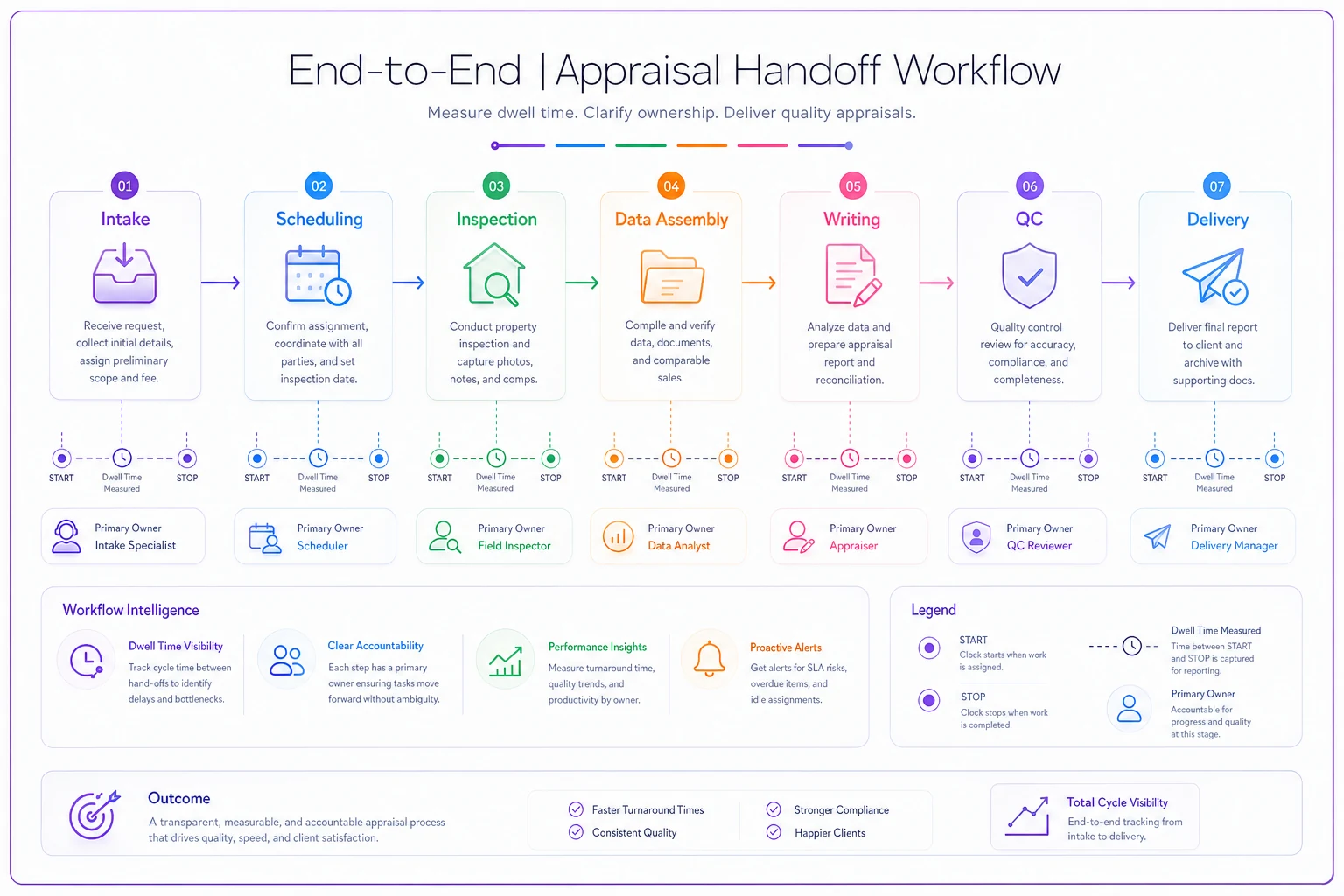
| Stage | SLA (business hours) | Clock STARTS when | Clock STOPS when | Primary owner |
|---|---|---|---|---|
| Intake & validation | 4 hrs | Order received in AMS | Order marked "accepted & validated" | Intake coordinator |
| Scheduling | 8 hrs | Order validated | Inspection appt confirmed by borrower | Scheduler |
| Inspection | By appt date | Appt confirmed | Field data + photos uploaded | Field appraiser |
| Data assembly | 12 hrs | Photos uploaded | Comps pulled, file "ready to write" | Appraiser / assistant |
| Report writing | 24 hrs | File ready to write | Draft marked "ready for QC" | Appraiser |
| QC / review | 8 hrs | Draft ready for QC | QC pass OR kickback issued | Reviewer |
| Revision loop | 6 hrs per cycle | Kickback issued | Revised draft resubmitted | Appraiser |
| Delivery | 2 hrs | QC pass | Report delivered to client portal | Delivery/admin |
A few things that matter more than the numbers:
Measure the gaps, not just the stages. The dangerous time is between stop and start — the file that passed QC at 4pm but didn't get delivered until 11am the next morning. Add a "dwell time" measurement at each handoff: the minutes between one stage's stop event and the next stage's start event. That's where your real turn-time leak lives, and it almost never shows up in stage-level reporting.
Business hours, defined explicitly. Pick your hours (say 8am–6pm, Mon–Fri) and state them once. A 4-hour intake SLA on an order that arrives at 5:30pm is due at 9:30am the next morning, not 9:30pm. A lot of "missed" SLAs are really just a clock that ran overnight.
Rush and complex tiers get their own row. Don't apply a 24-hour writing SLA to a 2004 on a rural parcel with three outbuildings. If you've built SLA-linked service tiers, the matrix should inherit those timings, not override them.
Below is a quick visual of the handoff workflow and the key clock start/stop points.
Rush and complex tiers get their own row. Don't apply a 24-hour writing SLA to a 2004 on a rural parcel with three outbuildings. If you've built SLA-linked service tiers, the matrix should inherit those timings, not override them.
'Definition of Done' checklists for each handoff
An SLA tells you when. A Definition of Done tells you whether it's actually finished. Without one, people hit "complete" to stop the clock, and the next person inherits a half-done file. That's the single biggest driver of revision loops in small shops — not bad work, just premature handoffs.
Manage every appraisal with confidence and clarity.
Rateoly helps you coordinate inspections, generate reports, and communicate seamlessly with clients.
- Comprehensive appraisal tracking
- Automated client notifications
- Integrated scheduling & report management
No credit card required
Each checklist below is the acceptance gate the receiving person checks before they start their clock. If it fails, it bounces back and the sender's clock keeps running.
Intake → Scheduling (DoD):
-
[ ] Property address validated against public record
-
[ ] Assignment type and form confirmed (1004 / 1073 / 2055, etc.)
-
[ ] Borrower/contact name + working phone + email present
-
[ ] Access notes captured (gate codes, lockbox, tenant-occupied flag)
-
[ ] Fee and due date match the engagement
-
[ ] Conflict/independence check cleared
Scheduling → Inspection (DoD):
-
[ ] Appointment date/time confirmed by the contact, not just proposed
-
[ ] Appraiser assigned and has accepted the slot
-
[ ] Special access requirements communicated to appraiser
-
[ ] Reschedule risk flagged (tenant, vacant, seasonal access)
Inspection → Data assembly (DoD):
-
[ ] Required photos present per your photo standard (count check)
-
[ ] Sketch/measurements captured
-
[ ] Subject condition rating recorded
-
[ ] Field notes legible and attached to the correct order
-
[ ] Any red-flag observations (safety, incomplete access) logged
Data assembly → Writing (DoD):
-
[ ] Minimum comp set pulled and within policy buffers
-
[ ] Flood cert, legal, and prior sale history attached
-
[ ] MLS/public-record discrepancies noted
-
[ ] Market condition data current for the effective date
Writing → QC (DoD):
-
[ ] All form fields complete, no "TBD" placeholders
-
[ ] Adjustments supported and reconciled
-
[ ] Exhibits attached (location map, sketch, photos labeled)
-
[ ] Narrative matches the data (no copy-paste mismatches)
QC → Delivery (DoD):
-
[ ] QC checklist signed off
-
[ ] Kickback items, if any, resolved and re-verified
-
[ ] Client-specific delivery requirements met (naming, format, portal)
If you can only do one thing, write DoDs for intake and scheduling first — catching problems early is far cheaper than fixing them later.
The pattern worth noticing: most firms write a DoD for the writing stage and nothing else. But the handoffs that actually cause rework are the early ones. A bad intake doesn't surface until the appraiser is standing at a locked gate, or the reviewer finds a missing flood cert at 6pm on a Friday. Catch it at the seam while it's cheap. Catch it later and it's expensive.
RACI with primary, backup, and OOO rules
The failure mode I'd flag above almost everything else: the entire workflow runs on one person who knows how everything connects, and when they take a Tuesday off, three orders silently stall. Small firms don't have a RACI problem because they're disorganized — they have one because the org chart lives in one person's head.
Keep the RACI light. For each stage you need four things: who does it, who covers when they're out, who gets told, and the out-of-office rule.
| Stage | Responsible (primary) | Backup | Informed | OOO rule |
|---|---|---|---|---|
| Intake | Coordinator A | Office manager | Assigned appraiser | Backup auto-assigned if primary unopened > 2 hrs |
| Scheduling | Scheduler | Coordinator A | Appraiser | Reassign at start of PTO day |
| Inspection | Field appraiser | Secondary appraiser (geo match) | Scheduler | Reassign 24 hrs before appt if OOO |
| Writing | Assigned appraiser | Review appraiser | — | Escalate if no start within SLA |
| QC | Reviewer | Senior appraiser | Appraiser | Second reviewer named per shift |
| Delivery | Admin | Office manager | Client contact | Backup covers any gap |
Two rules that make this actually hold:
OOO is a status, not a vibe. Someone has to flip the flag. The backup assignments only fire if the system or the office manager knows a person is out. Make "set your OOO before you leave" non-negotiable, and give the office manager authority to flip it for anyone who forgot.
Backup means pre-assigned, not "someone will grab it." "Someone will cover" is how orders die. Name the specific person for each stage. The reviewer's backup isn't "a senior appraiser" — it's a named human whose calendar you can actually check.
KPI definitions and exact calculation methods
KPIs cause more arguments than almost anything else, and it's always the same reason: two people calculating the "same" metric two different ways. Nail the formula down to the timestamp before anything goes on a dashboard.
On-time delivery rate > (Orders delivered on or before promised due date ÷ total orders delivered) × 100 > Count by delivery timestamp vs. promised date. An order delivered at 6:05pm on a 6:00pm-business-hours due date counts late. Decide that rule once and write it down.
Stage SLA adherence > (Stage completions within SLA ÷ total stage completions) × 100, calculated per stage. > This is where you find the actual bottleneck. Aggregate turn time hides it; per-stage adherence exposes it.
Revision rate > (Orders with ≥1 QC kickback ÷ total orders through QC) × 100 > Track first-pass yield alongside it — orders that cleared QC with zero kickbacks. First-pass yield is the number that actually correlates with capacity.
Handoff dwell time > Average minutes between one stage's stop event and the next stage's start event. > The quiet killer. Report it per handoff, not blended.
Reschedule rate > (Inspections rescheduled ÷ inspections scheduled) × 100 > Split by reason code (access, borrower, appraiser, weather). The reason split tells you whether it's an intake problem or a scheduling problem — they look identical in the aggregate.
Escalation wording and triggers
Escalations fail in two directions. Either nobody escalates until the file is already blown, or everything gets escalated and the manager starts tuning out the noise. The fix is defining the trigger precisely so escalation is mechanical — not a judgment call someone's trying to avoid.
-
Soft warning — stage hits 75% of SLA with no completion. Notify the primary owner only.
-
Hard escalation — stage SLA breached. Notify owner + backup + office manager.
-
Client-risk escalation — total order is within 4 business hours of the client due date and not yet in QC. Notify the manager and flag for proactive client communication.
Copy-paste wording:
> Soft warning (internal): "Heads up — Order #[ID] is at 75% of the [stage] SLA with no completion logged. Due in [X] hrs. Reply if blocked."
> Hard escalation (internal): "SLA BREACH — Order #[ID], [stage]. Blown by [X] hrs. Owner [name], backup [name]. Need a status in 30 min or reassignment."
> Client-risk (manager): "Order #[ID] is at risk for the [date] due date — currently in [stage], not yet QC. Decide now: expedite internally or proactively notify [client]."
The wording matters less than the trigger discipline. An escalation that fires automatically at a defined threshold gets acted on. One that depends on someone noticing and feeling worried gets skipped exactly when you need it most.
A real scenario: a four-person shop
A four-person residential shop — two appraisers, a scheduler/coordinator, and an owner who reviewed and delivered — was running around 90–100 orders a month. Turn times were drifting past client SLAs roughly a third of the time, and the owner couldn't tell where the time went. Every stage felt fine from the inside.
When they actually measured dwell time at the handoffs, the culprit was obvious and boring: files passed QC and then sat an average of 6–8 hours before delivery, because delivery lived in the owner's end-of-day batch. The writing wasn't slow. The gap after QC was slow.
They made two small changes. Delivery got its own 2-hour SLA and moved to the coordinator during business hours instead of the owner's evening batch. And they added the intake DoD, which cut the "locked gate" reschedules that had been quietly eating field days.
Over the following couple months, on-time delivery moved from around two-thirds to the low 90s, and the reschedule rate dropped by roughly a third. Nobody worked harder. They just stopped leaking time at two seams that nobody had been watching. The bottleneck was never a stage — it was the space between two stages that nobody owned.
The 30/60/90 rollout plan
Don't deploy all of this at once. Shops that try to flip the whole system in a week end up with staff quietly ignoring it by week two. Roll it in layers, measure, then tighten.
Days 1–30 — Measure and pilot (don't enforce yet)
-
Week 1
Add the stage timestamps to your AMS or spreadsheet. Don't set SLA targets yet — just capture start/stop events so you have a real baseline.
-
Week 2
Introduce the DoD checklists for intake and QC only. Run them as a soft habit, not a hard rule.
-
Week 3
Pilot on a subset — one appraiser, one client's orders. Measure dwell time and first-pass yield.
-
Week 4
Review the baseline as a team. Set realistic SLA targets from your actual data, not from a template.
Training script (Week 1 standup): "We're not grading anyone. For the next month we're just recording when each stage starts and ends so we can see where orders actually wait. Mark the stop event honestly — if a file isn't truly done, don't mark it done."
Days 31–60 — Enforce handoffs and SLAs
-
Roll the DoD checklists to all stages. A handoff that fails its DoD bounces back.
-
Turn on soft-warning escalations at 75%.
-
Assign the RACI backups and make OOO flags mandatory.
-
Weekly
review per-stage SLA adherence and dwell times. Fix the worst seam first.
Training script: "Starting this week, the person receiving a file checks the Definition of Done before they start. If it's missing items, bounce it — that's not being difficult, that's catching it while it's cheap."
Days 61–90 — Tighten and automate the noise
-
Turn on hard and client-risk escalations.
-
Review KPIs weekly
on-time delivery, first-pass yield, reschedule rate by reason.
-
Look for manual steps that are now just friction — status chasing, "did you get my file?" messages, OOO reassignment done by hand. These are the pieces worth letting your workflow software handle automatically, so your people only touch the exceptions.
-
End of 90
lock the SLA targets, document the final version, and fold it into onboarding for the next hire.
Pilot metrics to watch at each gate: baseline dwell time per handoff, first-pass yield, per-stage adherence, and reschedule rate. If those four are moving in the right direction, the rollout is working. If they're flat, you added process without removing friction — go back and find the seam you missed.
When this is worth it — and when it isn't
When it makes sense: You're past the point where one person can hold the whole workflow in their head. Usually that's three or more people, or enough volume that orders start slipping through the cracks. If you're missing client SLAs and genuinely can't explain where the time goes, this pays for itself pretty fast.
When it's overkill: A solo appraiser doing 20–30 orders a month doesn't need a six-stage RACI. You need solid intake discipline and a delivery checklist. The full matrix will just slow you down.
Who should not start here: If your intake is genuinely broken — wrong addresses, missing contacts, fee disputes on a significant chunk of your orders — fix that first. An SLA matrix on top of chaotic intake just measures the chaos more precisely. Get order validation solid, then layer the rest in.
The whole point of this pack is boring, and that's the feature. Standardized handoffs don't make the work more interesting — they make it so a Tuesday off doesn't stall three orders, and so the owner stops being the single point of failure between QC and delivery. Measure the seams, define what "done" actually means, name a backup for every role, and tighten from real data instead of guesses. Everything else is just keeping the clock honest.
Ready to elevate your appraisal operations?
Join 500+ appraisal firms using Rateoly to enhance accuracy, save time, and improve client satisfaction.