



Most appraisal firms don't get burned by a single dramatic data breach. They get burned by the slow accumulation of files nobody ever deletes, borrower Social Security numbers sitting in a "Completed Orders" folder from 2019, and export templates that carry PII into places they were never supposed to go. The problem isn't carelessness. It's that nobody designed the system for how data enters, moves, ages, and eventually leaves the firm.
An appraisal data retention policy isn't a document you write once and file away. It's a set of rules wired into how your file storage, integrations, and export process actually work day to day. When those rules exist only on paper, the operation drifts. And drift is where the mistakes live.
This is the whole-system view: what data you're holding, how long you should hold it, what should be stripped out, and how everything connects to your AMC portals, MLS pulls, and cloud storage. Retention and PII protection aren't really separate topics — they're the same problem seen from two angles.
Why appraisal files accumulate risk faster than most firms realize
An appraisal file is a strange animal. It's not one document — it's a bundle. You've got the borrower's name and property address (unavoidable), but riding alongside that are things you may not even remember collecting: loan numbers, borrower phone numbers and emails from order intake, occasionally a partial SSN buried in a title doc or a lender's transmittal, prior sales contracts with buyer/seller info, and inspection photos that sometimes catch personal items, mail on a counter, or a license plate in the driveway.
Multiply that by every order. A two-appraiser shop doing 25–35 reports a month is generating a surprising volume of sensitive fragments. Over three years that's roughly a thousand files, each a small container of borrower and third-party PII.
The pattern that shows up across firms of every size: data comes in through many doors and leaves through almost none. Orders arrive via AMC portals, email, and phone. Comps and public records get pulled in. Photos flood in from the field. But there's rarely a deliberate exit. Files just... stay. The "Archive" folder becomes a graveyard nobody audits, and every file in it is legal and regulatory exposure with zero business value once the retention obligation ends.
A second pattern: redaction is treated as a favor, not a rule. When a client asks for a copy, someone manually blacks out the loan number "if they remember." That's not a policy. That's a coin flip.
The retention matrix: stop treating all documents the same
The single biggest fix is refusing to apply one blanket rule to everything. A signed appraisal report and a random intake email do not deserve the same retention clock, and treating them identically means you either delete things you're legally required to keep or hoard things you should have purged years ago.
Manage every appraisal with confidence and clarity.
Rateoly helps you coordinate inspections, generate reports, and communicate seamlessly with clients.
- Comprehensive appraisal tracking
- Automated client notifications
- Integrated scheduling & report management
No credit card required
| Document class | Contains PII? | Typical retention | Redaction rule | Notes |
|---|---|---|---|---|
| Final signed report + workfile | Yes (property, borrower) | 5 yrs min (or per legal-hold) | Redact borrower contact info on client copies | The core USPAP obligation |
| Field photos (raw) | Sometimes (incidental) | Match report retention | Blur plates/mail/personal items before archive | Raw set purged after clean set built |
| Order intake emails | Often (phone, email, loan #) | 12–24 months | Strip loan #s if retained | Rarely needed after delivery |
| Title / prior sales docs | Frequently (buyer/seller) | Match report retention | Redact SSNs, DOBs immediately on receipt | High-risk, low-notice items |
| MLS / public record pulls | Low | 5 yrs (supports comps) | None usually needed | Keep provenance, drop nothing sensitive |
| Invoices / AR records | Low–moderate | 7 yrs (tax/accounting) | Mask full card/bank numbers | Different clock than the report |
| Correspondence w/ AMC/lender | Sometimes | 12–36 months | Case-by-case | Watch for embedded borrower data |
Your state and contracts will shift these numbers. The point isn't to memorize exact figures — it's that each class has a defined start date, end date, and handling standard. Once that's true, purging becomes a routine event instead of a scary one-off nobody wants to authorize.
Redaction and data minimization: collect less, keep less
The cleanest data you'll never lose is the data you never collected. Minimization sounds abstract until you look at your intake form and realize you're capturing borrower phone numbers you never call and loan details you never use for the valuation itself.
-
Question every intake field. If a field doesn't serve the valuation or a legitimate delivery need, stop collecting it. Every field you remove is one you never have to protect or purge later.
-
Redact on receipt, not on request. When a title doc arrives with a partial SSN, that's the moment to redact — not three years later when a client asks for a copy. Redaction-at-the-door means your archive is already clean.
-
Separate the "clean" photo set from the raw set. Field photos come in messy. Build the report-ready set with plates, visible mail, and personal effects blurred, then purge the raw originals on a short clock unless a specific reason exists to keep them.
-
Keep provenance without keeping PII. For comps, you need to defend where the data came from — an MLS number, pull date, public record reference — not borrower personal data. Don't confuse the two.
The mistake here is thinking redaction is only about the client-facing copy. Internal copies leak too. When a file gets emailed between reviewer and appraiser, or copied to a personal laptop to finish at home, that's where unredacted PII escapes your controls. Minimization narrows how much can ever leak in the first place.
If you haven't already tightened who can even see these files internally, that's the foundation everything else sits on — worth reviewing your role-based access and logging setup before worrying too much about redaction rules, because redaction means little if everyone in the shop has open access to the raw files.
Legal-hold workflow: the one exception that overrides everything
Here's a scenario that quietly sinks firms. You've got a clean retention policy. Files purge on schedule. Then a dispute surfaces — a borrower challenges a valuation, or a lender's involved in litigation — and your automated purge cheerfully deletes the exact file that's now evidence. That's spoliation, and it turns a defensible position into a nightmare regardless of whether your original work was solid.
A legal hold is an override that freezes deletion for specific files the moment you have reason to believe they're relevant to a dispute, complaint, or investigation. The trigger comes before a lawsuit is formally filed — the standard is reasonable anticipation, not a served summons.
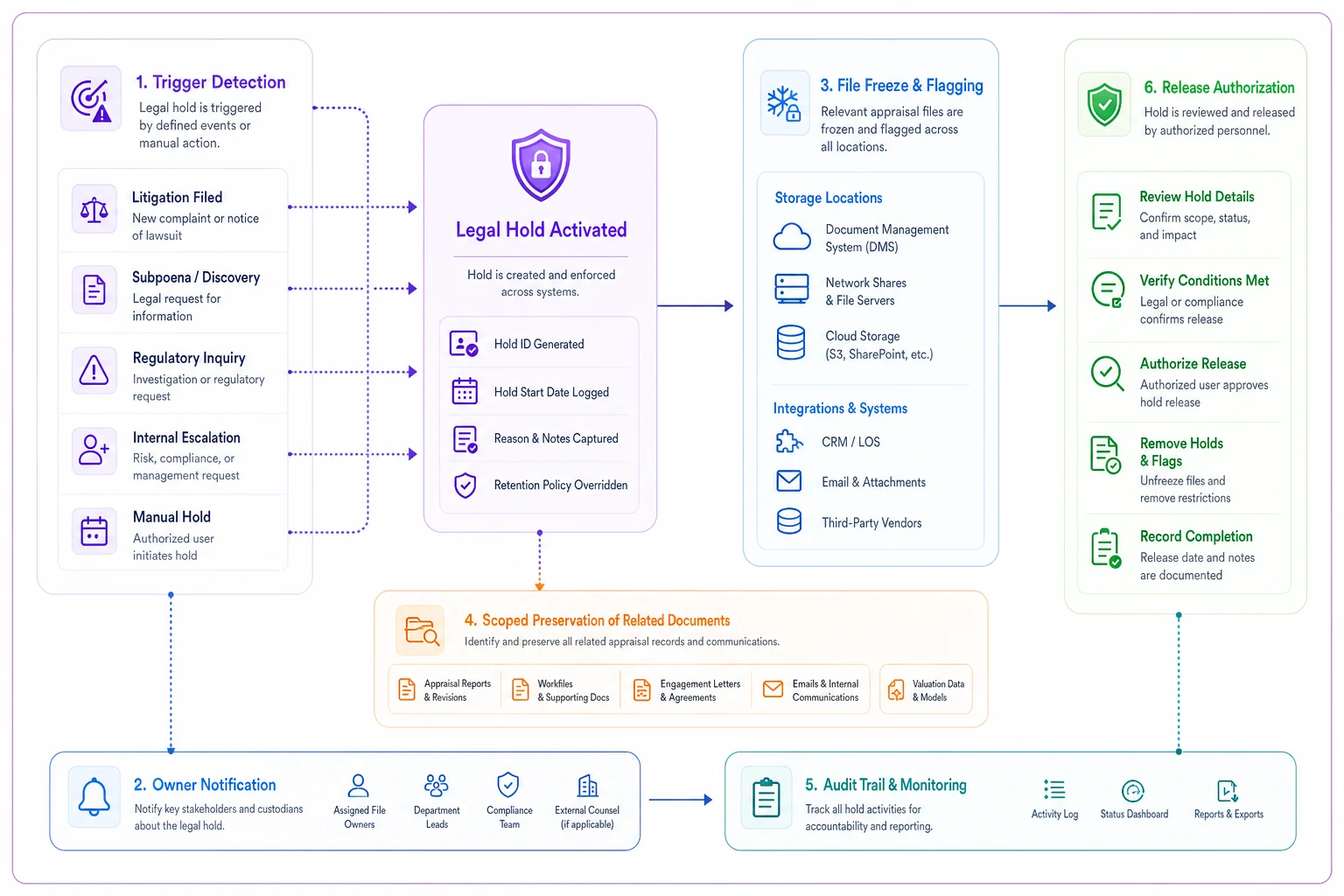
The workflow below outlines a lightweight legal-hold process for appraisal files.
-
Define triggers in writing. A board complaint, a demand letter, a lender's litigation notice, a subpoena, or even a heated dispute that looks like it's heading somewhere. List them so nobody has to improvise judgment under pressure.
-
Name one owner. Whoever gets the notice must know exactly who to alert. In small shops this is usually the owner or chief appraiser. One person, no ambiguity.
-
Freeze immediately, scope carefully. Flag the specific file(s) and related correspondence so no automated or manual purge touches them. Freeze the property, the order, the emails, the photos — the whole bundle.
-
Suspend the retention clock, document the date. Write down when the hold started and why. That record matters as much as the freeze itself.
-
Release only on written authorization. When the matter resolves, the same owner documents the release and the file returns to its normal retention clock.
The failure mode is that the legal hold lives entirely in one person's head. They go on vacation, a purge runs, and the frozen file quietly vanishes. That's why the hold has to be a flag on the file, not a mental note — something that mechanically blocks deletion regardless of who's watching.
Privacy-impact checklist for integrations
Integrations are where retention policies go to die. You can have an immaculate internal policy and still leak PII wholesale because your AMC portal, MLS connection, or cloud sync is quietly copying data somewhere your policy never reaches.
-
What PII does this integration actually see? Not what it's supposed to see. What it can access.
-
Where does the data physically land? A cloud sync that copies files to a third-party server just extended your retention obligation to a place you don't control.
-
Does it create copies you'll forget about? Every sync, every cache, every "convenience" copy is a shadow archive that won't obey your purge schedule.
-
Who at the vendor can access it, and is that in writing? The vendor's own retention and access terms are now part of your risk surface.
-
Can you get data back out and delete it on demand? If you can't export and purge on your terms, you don't actually control your retention clock anymore.
-
Is transfer encrypted and access logged? Both directions — pull and push.
Maintain a vendor-to-data-type matrix so each integration's access and retention obligations are visible at a glance.
Worth internalizing: an integration doesn't reduce your data footprint, it multiplies it. Every connection is another door PII walks through, and often another place it silently accumulates. Firms that stay clean treat each integration as an extension of their own retention policy, not an exception to it.
Audit-friendly retention and export templates
When a board examiner or a lender's compliance team asks for a file, the difference between a five-minute pull and a two-day scramble is whether your exports were designed for review or improvised each time.
The core idea: build a standard export package per document class, with redaction baked in. Not a manual black-out session every time. A repeatable format.
-
The final signed report (full, since the recipient is authorized)
-
The supporting workfile with a documented contents list
-
A source/provenance log for comps — where each came from, pull date
-
Access and activity history for the file — who touched it, when
-
A redaction note stating what was removed and why, if anything was
That redaction note matters more than people expect. When you hand over a file with certain fields masked, documenting what you redacted and under what rule is what makes the redaction look deliberate and policy-driven rather than like you're hiding something.
For internal audits, the export you want is different: a retention status report showing every file, its document class, its retention clock, its purge-eligible date, and any active legal hold. Being able to produce that on demand is what separates a firm that has a retention policy from a firm that can prove it follows one — which is the whole point when an examiner shows up. If you're building out the broader audit posture around this, it pairs directly with a proper appraisal compliance and evidence framework.
What breaks at scale
At two or three appraisers, retention drift is survivable through sheer familiarity — someone remembers which files are sensitive, someone manually cleans exports. The wheels come off somewhere around the point where you add a third or fourth appraiser, a dedicated review role, or a second office.
First, the mental map disappears. When one person knew every file's status, purging felt safe. Add staff and suddenly nobody's sure which files are under legal hold, so the safe move becomes deleting nothing. Retention grinds to a halt and the archive balloons.
Second, redaction becomes inconsistent. Three appraisers redact three different ways, or not at all. The clean-copy standard that lived in one person's habits now needs to be an explicit rule, or client copies start going out with borrower loan numbers intact.
Third, integrations sprawl. More people means more tools, more portals, more "I just synced it to Dropbox so I could finish at home." Each convenience creates a new uncontrolled copy, and the retention policy you wrote covers maybe half of where the data actually lives.
The firms that scale cleanly stopped relying on memory early. They put the retention clock, the redaction standard, and the legal-hold flag into the system that stores the files — so purge dates fire automatically, held files can't be deleted, and exports come out redacted by default no matter who runs them. Operational software with built-in automation handles exactly this kind of workflow well: applying a document class on intake, running the retention clock in the background, blocking purges on held files, generating audit-ready export packages without someone manually assembling them each time. The value isn't the automation for its own sake — it's that the policy actually executes instead of sitting in a binder.
When strict retention rules make sense — and when you're overdoing it
Tightening retention isn't automatically the right move for every firm at every moment.
This makes sense when: you're growing past the point where one person can track everything, you work with multiple AMCs and lenders each with their own requirements, you've had even one near-miss with a misplaced file, or you're carrying years of archived orders nobody has looked at.
You might be overdoing it when: you're a solo shop keeping everything because storage is cheap and the mental overhead of a formal matrix genuinely outweighs the risk. Even then, redaction-on-receipt and a legal-hold trigger list are worth ten minutes to put together. The genuinely bad version of "strict" is purging aggressively without a legal-hold override in place — deleting faster than your obligations allow, or deleting a file that should have been frozen, is worse than hoarding.
Who should not aggressively purge: any firm currently in, or reasonably anticipating, a dispute on a specific file. When in doubt, freeze it and ask. Don't delete it and hope.
A short real scenario
A three-appraiser residential shop in a mid-size market — roughly 30 orders a month across four AMCs — realized during a routine board inquiry that they couldn't quickly tell which archived files still needed keeping and which were long past any obligation. Their archive held close to four years of everything, redacted inconsistently, with borrower emails and a handful of partial SSNs scattered through intake threads.
They didn't do anything dramatic. They built a document-class matrix, set redaction-on-receipt as a standing rule, wrote a five-line legal-hold trigger list, and moved the retention clock into their file system so purge dates fired automatically. Pulling a clean, redacted file for a client went from a "someone will get to it this week" situation to something that took a few minutes. Their archive shrank meaningfully once purge-eligible files started clearing on schedule — and when the next examiner request came in, they produced a retention status report the same day instead of stalling.
Nothing about that outcome required exotic tooling. It required treating retention as a running system with defined classes, an override for legal holds, and exports built for review — instead of a policy document nobody had opened since it was written.
Pulling it together
Retention and PII protection in appraisal work aren't a compliance chore you bolt on at the end. They're a description of how data actually flows through your firm — in through many doors, aging on defined clocks, stripped of what you don't need, frozen when a dispute looms, and out through exports built to survive review.
Get the system right and the individual rules mostly take care of themselves. Leave it to memory and good intentions, and the drift will find you eventually — usually on the exact file you wish you'd handled better.
Start with the matrix. Give every document class a clock. Make redaction a rule instead of a favor. Write down what triggers a hold. Check every integration against what it can touch, not just what it's supposed to. That's the difference between a retention policy that exists and one that actually protects the firm.
Ready to elevate your appraisal operations?
Join 500+ appraisal firms using Rateoly to enhance accuracy, save time, and improve client satisfaction.