



Most batch rejections don't happen because the appraisal work is wrong. They happen because a filename had a space where the AMC's parser expected an underscore, or the manifest said 14 files and the folder had 13, or the DocType said URAR but the schema wanted 1004. Boring stuff. Expensive stuff.
This is the page I wish existed when we were first standardizing batch delivery. No theory. You get an appraisal manifest template in four formats, filename rules you can paste into a validator, and a full worked example — folder layout, one manifest row, and the actual SHA‑256 so you can test your own pipeline against it.
If your exceptions are coming from file structure and metadata upstream of the manifest, that's a slightly different problem — we covered the pre‑send checklist for that in the pre‑send file‑structure and metadata post. This post picks up at the manifest layer: what the batch says about itself, and whether that matches reality.
The DocType dictionary first (everything else maps to this)
The single biggest source of silent manifest failures is DocType drift. One appraiser writes URAR, another writes 1004, the AMC portal wants APPR_URAR. All three mean the same document. The parser treats them as three different things, and two of them bounce.
| Canonical DocType | Description | Common aliases to reject | Expected extension |
|---|---|---|---|
APPR_1004 | Uniform Residential Appraisal Report (SFR) | URAR, 1004, FNMA1004 | .pdf |
APPR_1073 | Individual Condo Report | condo, 1073 | .pdf |
APPR_1025 | Small Residential Income (2–4 unit) | 1025, multifamily | .pdf |
APPR_2055 | Exterior‑Only Inspection | 2055, drive‑by | .pdf |
MISMO_XML | MISMO 2.6 / 2.6 GSE XML payload | mismo, xml | .xml |
PHOTO_SUBJ | Subject property photos | photos, subject | .jpg |
PHOTO_COMP | Comparable photos | comps, comp_photos | .jpg |
SKETCH | Floor plan / sketch | sketch, floorplan | .pdf |
MAP_LOC | Location / comp map exhibit | map, locationmap | .pdf |
INVOICE | Billing invoice | inv, bill | .pdf |
ENGAGEMENT | Engagement / order letter | eng, order | .pdf |
The rule that actually matters: the manifest references the canonical code, never the alias. If your intake accepts aliases, map them to canonical at import, not at delivery. The delivered manifest should only ever contain the left column.
Firms that get this wrong usually have no single owner for the dictionary. It lives in someone's head, or spread across three slightly different spreadsheets that nobody's reconciled in months. Put it in one file, version it, and make it the source of truth the manifest validates against.
The CSV manifest template
``csv
filename,doctype,filesizebytes,sha256,pagecount,orderid,parcelapn,createdutc
subjectreport.pdf,APPR1004,2459317,e3b0c44298fc1c149afbf4c8996fb92427ae41e4649b934ca495991b7852b855,42,ORD-2026-00817,081-234-56,2026-03-11T14:22:08Z
subjectmismo.xml,MISMOXML,118442,9f86d081884c7d659a2feaa0c55ad015a3bf4f1b2b0b822cd15d6c15b0f00a08,,ORD-2026-00817,081-234-56,2026-03-11T14:22:09Z
photossubject.jpg,PHOTOSUBJ,3841200,2c26b46b68ffc68ff99b453c1d30413413422d706483bfa0f98a5e886266e7ae,,ORD-2026-00817,081-234-56,2026-03-11T14:19:55Z
invoice.pdf,INVOICE,88241,486ea46224d1bb4fb680f34f7c9ad96a8f24ec88be73ea8e5a6c65260e9cb8a7,1,ORD-2026-00817,081-234-56,2026-03-11T14:22:10Z
``
Manage every appraisal with confidence and clarity.
Rateoly helps you coordinate inspections, generate reports, and communicate seamlessly with clients.
- Comprehensive appraisal tracking
- Automated client notifications
- Integrated scheduling & report management
No credit card required
Field notes that save you from the common mistakes:
-
sha256is lowercase hex, 64 characters, no0xprefix. A surprising number of reconciliation failures trace back to one side uppercasing the hash. Pick lowercase and enforce it everywhere. -
filesizebytesis an integer, not2.4 MB. Parsers choke on units. -
created_utcis ISO‑8601 with theZ. Local timestamps without a timezone create audit headaches months later when nobody remembers where the firm was operating from. -
page_countcan be blank for non‑paginated files (XML, JPG). Leave it empty — don't put0orN/A. -
parcel_apnkeeps the manifest useful for internal reconciliation even if the AMC ignores it.
parcel_apn keeps the manifest useful for internal reconciliation even if the AMC ignores it.
The JSON manifest template
``json
{
"batchid": "BATCH-2026-03-11-0042",
"orderid": "ORD-2026-00817",
"generatedutc": "2026-03-11T14:22:12Z",
"filecount": 4,
"files": [
{
"filename": "subjectreport.pdf",
"doctype": "APPR1004",
"filesizebytes": 2459317,
"sha256": "e3b0c44298fc1c149afbf4c8996fb92427ae41e4649b934ca495991b7852b855",
"pagecount": 42,
"parcelapn": "081-234-56",
"createdutc": "2026-03-11T14:22:08Z"
},
{
"filename": "subjectmismo.xml",
"doctype": "MISMOXML",
"filesizebytes": 118442,
"sha256": "9f86d081884c7d659a2feaa0c55ad015a3bf4f1b2b0b822cd15d6c15b0f00a08",
"pagecount": null,
"parcelapn": "081-234-56",
"createdutc": "2026-03-11T14:22:09Z"
}
]
}
``
The filecount at the top is there for a reason: it's a cheap self‑check. Before anything parses a single hash, it can compare filecount against files.length and against the actual folder. A mismatch there is almost always a packaging script that dropped a file or ran twice.
Use null for missing numerics in JSON, not empty strings. A validator with a strict schema will reject "page_count: """ as a type error. That's a straightforward fix, but it trips up a lot of people who copy the CSV format over without adjusting for JSON's type rules.
The XML manifest template
``xml
<?xml version="1.0" encoding="UTF-8"?>
<manifest batchid="BATCH-2026-03-11-0042" orderid="ORD-2026-00817">
<generatedutc>2026-03-11T14:22:12Z</generatedutc>
<filecount>4</filecount>
<files>
<file>
<filename>subjectreport.pdf</filename>
<doctype>APPR1004</doctype>
<filesizebytes>2459317</filesizebytes>
<sha256>e3b0c44298fc1c149afbf4c8996fb92427ae41e4649b934ca495991b7852b855</sha256>
<pagecount>42</pagecount>
<parcelapn>081-234-56</parcelapn>
<createdutc>2026-03-11T14:22:08Z</createdutc>
</file>
<file>
<filename>subjectmismo.xml</filename>
<doctype>MISMOXML</doctype>
<filesizebytes>118442</filesizebytes>
<sha256>9f86d081884c7d659a2feaa0c55ad015a3bf4f1b2b0b822cd15d6c15b0f00a08</sha256>
<pagecount></pagecount>
<parcelapn>081-234-56</parcelapn>
<createdutc>2026-03-11T14:22:09Z</createdutc>
</file>
</files>
</manifest>
``
One quiet trap: XML encoding. If a filename or APN ever contains &, it must be escaped as & or the whole document fails to parse. The simplest defense is the filename rules below — which forbid those characters outright, so the problem never comes up in the first place.
A MISMO snippet for the payload itself
``xml
<DEALSET MISMOReferenceModelIdentifier="2.6">
<DEAL>
<LOANS>
<LOAN>
<LOANIDENTIFIERS>
<LOANIDENTIFIER>
<LoanIdentifier>ORD-2026-00817</LoanIdentifier>
<LoanIdentifierType>LenderLoan</LoanIdentifierType>
</LOANIDENTIFIER>
</LOANIDENTIFIERS>
</LOAN>
</LOANS>
</DEAL>
</DEALSET>
``
A reconciliation habit worth building: the LoanIdentifier inside MISMO and the order_id in your manifest should match exactly. When they don't, it's usually a copy‑paste from the wrong order — and catching it at packaging beats catching it at underwriting.
Filename rules you can actually enforce
Filenames are where good batches go to die. Spaces, parentheses from report (1).pdf, trailing periods from Windows, non‑ASCII characters from copied addresses — each one breaks a different parser in a different way.
-
Allowed characters lowercase/uppercase letters, digits, underscore, hyphen, single dot before the extension
-
Forbidden characters spaces, and any of
< > : " / \ | ? * & # % { } $ ! ' @ + =plus control characters and non‑ASCII -
No leading/trailing spaces or dots
-
No double extensions (
report.pdf.pdf) -
Max length 100 characters including extension (many archives cap paths, and 100 leaves headroom for folder prefixes)
-
Extension must match DocType (see the dictionary table above)
A regex that validates the whole filename in one pass:
``
^[A-Za-z0-9][A-Za-z0-9-]{0,94}\.(pdf|xml|jpg)$
`
That pattern enforces: starts with a letter or digit (no leading dot or dash), allows only safe characters, caps the stem length, and requires one of the three expected extensions.

If you want to check just for forbidden characters regardless of length:
`
[^A-Za-z0-9.-]|\s|\.\.|^\.|\.$
``
A match means the filename is invalid. Run it across the folder before you ever generate the manifest — it's the single highest‑return check in the whole pipeline.
Run the regex against the actual directory listing, not just the manifest.
One thing worth flagging: most firms validate the manifest but not the filenames on disk. The manifest can be perfect and still reference a file the OS silently renamed when someone saved it. Validate the actual directory listing, not just what the script thinks it wrote.
The worked end‑to‑end example
This is the part you can test against. A complete batch folder, the manifest row for one file, and how to compute the hash yourself.
Folder layout:
``
BATCH-2026-03-11-0042/
├── manifest.csv
├── subjectreport.pdf
├── subjectmismo.xml
├── photos_subject.jpg
└── invoice.pdf
``
The sample file. Take a file containing exactly this single line of text, with a trailing newline:
``
appraisal-manifest-reconciliation-test
``
-
macOS/Linux
printf 'appraisal-manifest-reconciliation-test\n' | shasum -a 256 -
Windows PowerShell save the content to
test.txt, thenGet-FileHash test.txt -Algorithm SHA256
The point isn't the specific digest — it's the method. Hash the bytes, lowercase the output, compare it to the manifest field. If your packaging tool and your verification tool produce the same string for the same file, your reconciliation is sound. If they differ, you've got a newline‑normalization or encoding problem to fix before you touch real appraisals.
``csv
test.txt,APPR_1004,39,<your-computed-hash>,,ORD-2026-00817,081-234-56,2026-03-11T14:22:08Z
`
39 bytes = 38 characters + the trailing newline. If your byte count disagrees, your editor added a \r` — another common cause of hash mismatches between Windows and Unix machines.
The reconciliation process, step by step
Run this in order. The sequence matters because each step eliminates a class of failure before the next, more expensive, check:
-
List the directory. Count files. Compare against
file_countin the manifest. Stop if they differ. -
Validate every filename against the regex. Stop if any file matches the forbidden‑character pattern.
-
Check extension vs DocType for each row using the dictionary. Reject
.pdftaggedMISMO_XML, etc. -
Compute SHA‑256 for each file on disk. Compare, lowercased, to the manifest hash.
-
Compare file sizes as a cheap secondary check — a size match with a hash mismatch usually means a truncated or re‑saved file.
-
Cross‑check identifiers —
order_idin the manifest againstLoanIdentifierin the MISMO payload. -
Confirm no extra files exist in the folder that aren't in the manifest. Stray
.DS_StoreorThumbs.dbfiles cause more rejections than most people expect.
Step 7 catches the embarrassing stuff. A .DS_Store from a Mac or a leftover ~$report.pdf temp file from Word will show up in the directory listing and blow the count check. Exclude them explicitly or strip them before packaging.
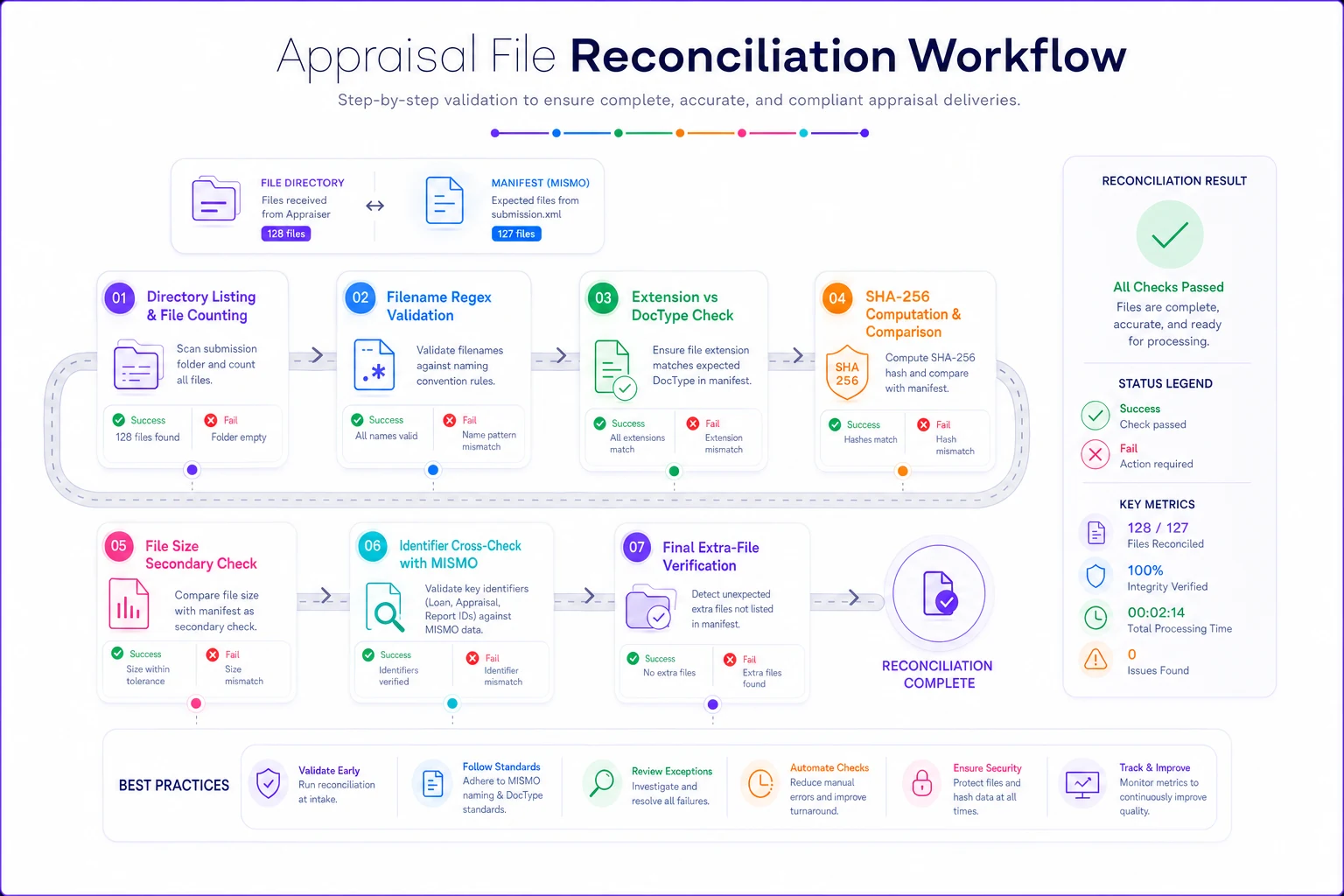
A simple flowchart of the reconciliation steps is handy to pin near the packaging station for quick reference.
A pre‑ship checklist
Before a batch leaves your shop, run through this:
-
[ ] Every
doc_typeuses a canonical code from the dictionary — zero aliases -
[ ] All filenames pass the validation regex
-
[ ] No spaces, ampersands, or non‑ASCII characters anywhere in filenames
-
[ ] Each file's extension matches its DocType
-
[ ] Every
sha256is 64 lowercase hex characters -
[ ]
file_countequals actual file count equals manifest row count -
[ ] Timestamps are ISO‑8601 with
Z -
[ ] No hidden/system/temp files in the batch folder
-
[ ]
order_idmatches the identifier inside the MISMO payload -
[ ] File sizes in the manifest match bytes on disk
Print it, pin it, or bake it into whatever script generates your batches. The checklist costs two minutes and routinely saves a same‑day resubmission.
A quick real scenario
A three‑appraiser shop doing mostly AMC work was running somewhere around a 12–15% batch rejection rate — not on the valuations, on the packaging. Most of it traced back to two things: filenames with spaces and addresses (123 Oak St report.pdf) and inconsistent DocType labels across the three appraisers.
They did two unglamorous things. First, they adopted a canonical DocType dictionary and a filename regex, and wired both into a pre‑ship check. Second, they added the file_count + SHA‑256 reconciliation step so a dropped or re‑saved file got caught before upload instead of after.
Within a couple of months, packaging‑related rejections dropped to roughly 2–3%, and the resubmissions that used to eat an hour here and there mostly disappeared. No new software suite, no big project — just a dictionary, a regex, and a seven‑step check run every time.
Where automation genuinely helps — and where it doesn't
The validation logic above is deterministic. You don't need anything intelligent to compare a hash or match a regex — and honestly you shouldn't want to. This is exactly the kind of check that should be boring, repeatable, and 100% reliable. A plain script or a workflow rule in whatever operational platform you already use is the right tool.
Where automation earns its keep is the mapping layer — catching that an appraiser typed URAR and quietly normalizing it to APPR_1004 at intake, or flagging that a filename is 104 characters before anyone tries to deliver it. If your system already tracks orders and documents, having it run the manifest and filename checks automatically at the moment of packaging means the rejection never reaches the AMC. The value is in consistency, not cleverness. Keep the rules explicit, keep them in one place, and let the machine run them every single time.
The firms that reconcile cleanly aren't doing anything exotic. They picked exact field names, forbade the characters that break parsers, and verified bytes with a hash instead of hoping the right file got attached. Copy the templates, steal the regex, test the worked example against your own tooling, and your next batch should go through on the first upload.
The firms that reconcile cleanly aren't doing anything exotic. They picked exact field names, forbade the characters that break parsers, and verified bytes with a hash instead of hoping the right file got attached. Copy the templates, steal the regex, test the worked example against your own tooling, and your next batch should go through on the first upload.
Ready to elevate your appraisal operations?
Join 500+ appraisal firms using Rateoly to enhance accuracy, save time, and improve client satisfaction.