



The mortgage industry runs on automated file validators now. Every major lender has their own black-box system that scans incoming appraisal packages before any human sees them. These systems check file structures, metadata completeness, naming conventions, and tag formats. Fail their rules, and your file gets kicked back with a generic "validation error" message that tells you nothing useful.
Most appraisal firms discover these requirements through trial and error. Submit a file, wait for rejection, guess what went wrong, resubmit. Each rejection costs hours of back-and-forth plus the risk of missing deadlines. The whole cycle feels ridiculous when you know the appraisal itself is solid — you're just wrestling with invisible technical requirements.
What makes this harder is that every lender has slightly different rules. Wells Fargo wants underscores in file names, Chase wants hyphens. Quicken requires EXIF data on photos, PennyMac strips it. Some systems reject PDFs over 10MB, others cap individual images at 2MB. You end up maintaining different submission processes for different clients, and someone always forgets which rules apply where.
The metadata trap that catches everyone
File metadata isn't something appraisers think about until it causes problems. You take photos, compile reports, create PDFs — standard stuff. But automated validators scan for specific metadata fields that your standard workflow probably doesn't populate correctly.
Take photo metadata. Your inspector takes 50 photos of a property using their phone. Those photos have GPS coordinates, timestamps, device information embedded in EXIF data. Some lenders require this data intact as proof of inspection. Others reject files containing GPS data for privacy reasons. The same photo file passes one system and fails another.
PDF metadata creates similar issues. When you export from your appraisal software, it embeds creator information, modification dates, software version numbers. Some validators check these fields for consistency. If your PDF shows it was created Monday but contains photos dated Wednesday, rejection. If the creator field shows "Microsoft Word" but the file structure suggests TOTAL or ACI, rejection.
Then there's the XML companion files many systems now require. These aren't visible when you open the PDF, but validators parse them for structured data. Missing a required field in the XML means your perfectly formatted PDF gets bounced. The XML might need the census tract in a specific format, or the comparables listed in a particular order. Miss these invisible requirements and you'll spend hours trying to figure out why your file keeps failing.
Naming conventions that actually work
File naming seems simple until you realize every character matters to automated systems. Spaces, special characters, capitalization — they all trigger different validation rules.
Manage every appraisal with confidence and clarity.
Rateoly helps you coordinate inspections, generate reports, and communicate seamlessly with clients.
- Comprehensive appraisal tracking
- Automated client notifications
- Integrated scheduling & report management
No credit card required
A working naming convention needs to handle multiple file types while staying consistent. Start with the loan number or case ID as your anchor. Add the property address in a standardized format — numbers only for street addresses, abbreviated street types, no unit numbers in the main identifier. Date stamps should follow ISO format (YYYY-MM-DD) to avoid confusion between US and international date formats.
A structure that passes most validators:
| Type | Pattern / Example |
|---|---|
| Main report | [LoanNumber][StreetNumber][StreetName][ReportType][YYYY-MM-DD].pdf Example: 4782911847Main1004URAR2024-11-15.pdf |
| Supporting documents | [LoanNumber][DocType][SequenceNumber][YYYY-MM-DD].[ext] Example: 478291Photos012024-11-15.jpg |
| Supplemental forms | [LoanNumber][FormNumber][YYYY-MM-DD].pdf Example: 4782911004MC2024-11-15.pdf |
The sequence numbers matter for photos and exhibits. Validators often check that photos are numbered consecutively with no gaps. If you have photos 01 through 47, then jump to 49, some systems flag this as missing documentation.
Keep total file paths under 200 characters. Windows allows 260, but many validation systems have shorter limits. That means your folder structure needs to stay flat — avoid nesting folders within folders. One folder per loan, all files at the same level.
Structured tags and why they break
Modern appraisal files aren't just PDFs anymore. They're packages of structured data with specific tags that automated systems parse. These tags live in the file headers, XML sidecars, or embedded form fields. Get them wrong and the validator can't extract the data it needs.
Form field tags cause the most problems. Your software might label a field "Adjusted Sale Price" while the validator looks for "AdjSalePrice" or "adjsaleprice". These mismatches mean the system can't find required data even though it's clearly visible in the PDF.
Some validators require specific tag hierarchies. The subject property data needs to be tagged under a "Subject" parent node, comparables under "Comps", adjustments under "GridAdj". Break this hierarchy and the parser fails. Your PDF looks perfect to humans but appears empty to the machine.
Geographic tags particularly trip people up. Census tract, MSA code, latitude/longitude — these need exact formatting. Census tracts must include state and county FIPS codes. MSA codes need the full 5-digit format. Coordinates must use decimal degrees, not degrees-minutes-seconds. One wrong format and the geo-validation fails.
The worst part about tag problems is the error messages rarely help. You get "Missing required field: Location" when the location is clearly shown on page 2. The validator means the structured location tag is missing, not the visible text. Good luck figuring that out from the error message alone.
Pre-send validation that actually catches problems
Running your own validation before submission saves hours of rejection cycles. But most firms just check if the PDF opens and call it good. Real pre-send validation needs to catch the specific issues that trip automated systems.
Start with file structure validation. Check that all required components exist — main report, photos, location map, sketch, addenda. Verify file sizes stay under limits. Confirm naming conventions match requirements. Count photo files to ensure none are missing from the sequence. This basic checking alone catches a significant portion of rejections before they happen.
For metadata validation, you need tools that can read EXIF, PDF properties, and XML structures. Adobe Acrobat shows some PDF metadata but misses embedded XML. EXIF viewers handle photos but not documents. You end up needing multiple tools or scripts to check everything. Many firms just skip this step and hope for the best.
A proper validation checklist looks something like:
Run lender-specific validation profiles before final packaging.
File Structure
-
All required documents present
-
File naming follows convention
-
File sizes within limits
-
No duplicate files
-
Sequential numbering intact
Metadata Completeness
-
PDF creator field populated
-
Creation/modification dates logical
-
Photo EXIF data present (or removed, depending on requirements)
-
XML sidecar validates against schema
-
Form fields properly tagged
Content Consistency
-
Dates match across documents
-
Address formatting consistent
-
Appraiser info matches signature blocks
-
Photo counts match references in report
-
Page numbers sequential
Here's a simple workflow visualization.
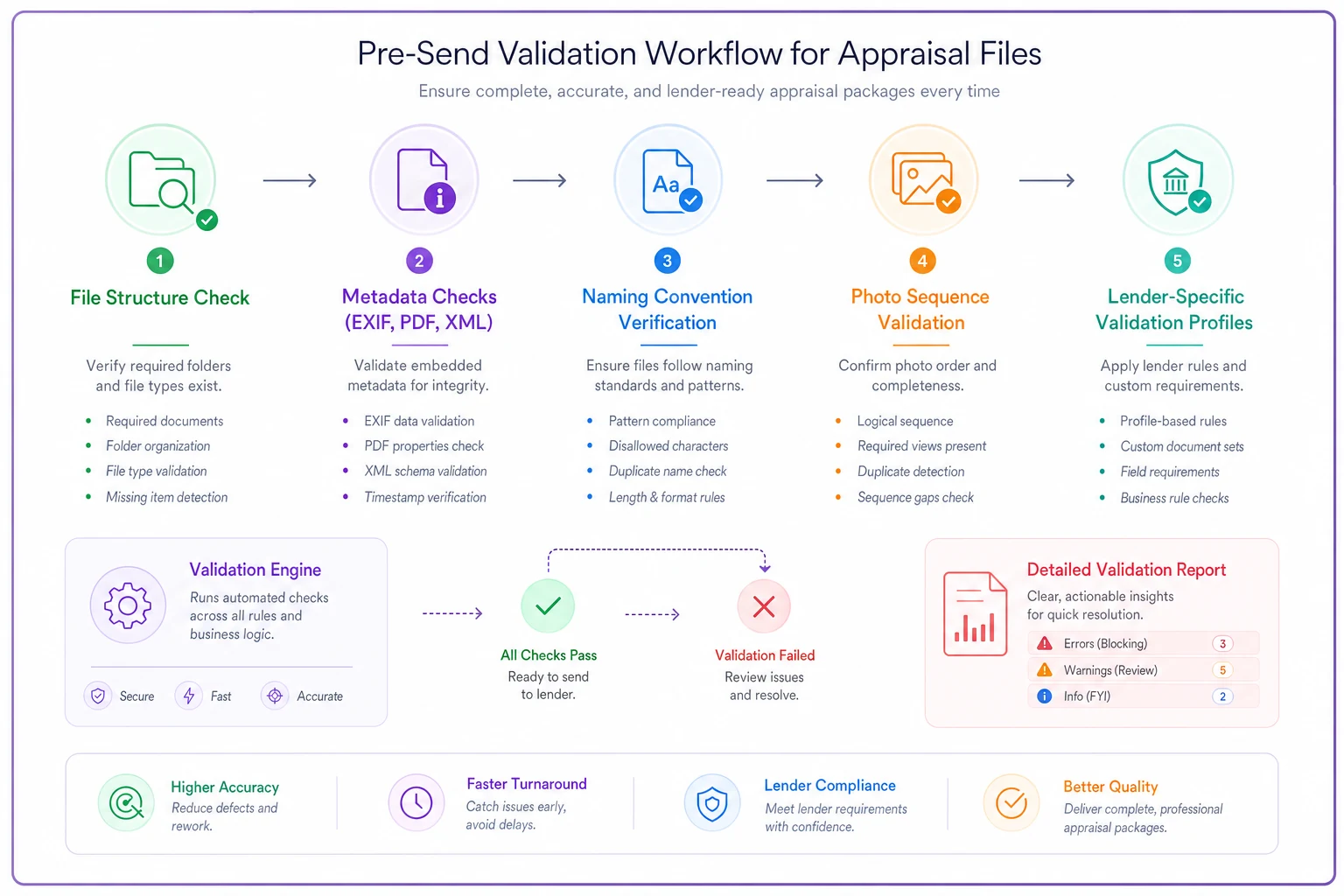
The trick is building validation that matches your actual submission requirements. Generic validators miss client-specific rules. You need validation tuned to each lender's quirks, which means maintaining multiple validation profiles.
Building your pre-submission checklist
A working checklist needs to be specific enough to catch real problems but simple enough that staff actually use it. Long, complex checklists get ignored. Short ones miss critical issues.
Organize by submission stage, not file type. Start with document compilation — ensuring all pieces exist before you begin formatting. Move to structure and naming. Then metadata and tagging. Finally, package validation — checking that the complete submission works as a unit.
Your checklist should distinguish between requirements and preferences. Required: loan number in filename. Preference: using underscores instead of hyphens. Mark the actual rejection triggers clearly so staff know what really matters versus what's just nice to have.
Include resolution steps, not just checks. Instead of "Verify photo metadata," write "Verify photo metadata using EXIF tool, remove GPS data if present for Chase submissions." The checker needs to know both what to look for and what to do when something's wrong.
Update the checklist based on actual rejections. Every time a file gets kicked back, figure out why and add that check if it's missing. But also cut checks that never catch anything — a checklist that only grows eventually becomes useless.
Common validation failures and their fixes
The mixed-source PDF problem: You compile a PDF from multiple sources — some pages from your appraisal software, some from scanned documents, some from photo exports. Each source embeds different metadata. Validators see these inconsistencies and reject the file. Fix: rebuild the entire PDF from a single source or use PDF flattening tools to strip and rebuild metadata consistently.
The photo resolution trap: Photos look fine on screen but fail validation. The issue is usually DPI settings. Some validators require exactly 300 DPI, others accept 72–300. But if your photo is 72 DPI and 4000x3000 pixels, some validators read this as "low resolution" even though the image quality is excellent. Fix: batch process photos to standard DPI before including them.
The invisible character issue: File names look correct but keep failing. The problem is invisible Unicode characters — especially common when copying names from emails or web forms. That space might be a non-breaking space. That hyphen might be an en-dash. Fix: retype file names manually or use a text editor that shows hidden characters.
The form version mismatch: Your software generates a 2022 version of a form, but the validator expects 2023. The content is identical, but the version tag differs. This often happens with supplemental forms that don't update frequently. Fix: verify form versions before submission or maintain templates for each required version.
Creating reusable validation templates
Building validation templates for each client prevents recurring issues. These aren't document templates — they're requirement profiles that define what each lender needs.
A complete template covers file requirements, metadata rules, naming patterns, and validation sequences. Store these as simple documents your team can reference, not complex systems they'll avoid. Include example file sets that passed validation, so staff can see exactly what success looks like.
For each lender, document:
-
Required files and acceptable formats
-
Size limits (individual and total)
-
Naming convention with real examples
-
Metadata requirements and prohibitions
-
Special form or tag requirements
-
Known rejection triggers
-
Contact info for technical support
Keep templates versioned and dated. Lenders change requirements without notice. When someone discovers a new requirement through a rejection, update the template immediately and mark the change clearly so staff know what's different.
Share templates in a central location everyone works from. Individual copies get out of sync fast. Include a simple way to flag issues — if someone finds a template wrong, they need an easy path to report it.
The operational reality of metadata management
Managing appraisal file metadata isn't just a technical problem — it's a workflow challenge that touches every part of your operation. Field photo standards you've implemented for visual requirements need to align with metadata requirements. Your inspector taking perfect photos means nothing if the files don't carry the right digital signatures.
Smaller firms often handle this with manual checks and hope. One person becomes the "submission expert" who knows all the quirks. This works until that person is sick, quits, or makes a mistake on a rushed Friday afternoon. Then you're scrambling to figure out why files that "always worked" suddenly don't.
The better approach is systematic. Build validation into your standard workflow, not as an add-on step. When inspectors upload photos, validate metadata immediately. When report writers export PDFs, check structure automatically. Catch problems at the source instead of during final review when fixes require regenerating entire documents.
Once you start tracking validation failures, patterns emerge. Maybe afternoon photo uploads fail more often because your inspector's phone switches timestamp formats. Maybe PDFs exported on Mondays fail because your software doesn't clear cache properly after weekend updates. These patterns point to process fixes that prevent entire categories of rejections.
What happens when validation rules conflict
The real mess starts when multiple lenders have requirements that directly contradict each other. One wants GPS data preserved, another demands it stripped. One requires fillable PDF forms, another only accepts flattened documents.
Some firms try to handle this by creating the most restrictive possible files — stripping everything that anyone might reject. This often backfires. Validators looking for specific metadata fail when it's missing. You end up with files that nobody accepts instead of files everyone accepts.
The practical solution is maintaining parallel processes. Not parallel systems — that's too complex — but parallel preparation steps. Start with a master file that contains everything. Then create lender-specific versions through automated processing. Strip GPS data for Chase, flatten forms for Wells Fargo, resize images for Quicken. Each transformation follows a recipe you've tested.
Document these transformations clearly. When a file gets rejected, you need to know exactly what processing it went through. Was the GPS data actually stripped? Did the flattening process run? Without this documentation, you're debugging blind.
Moving beyond rejection cycles
The typical appraisal firm learns validation requirements through rejection — submit, fail, fix, repeat. Each rejection costs hours and risks client relationships. But once you understand what validators actually check, you can build processes that pass consistently.
This isn't about perfection. Even with solid processes, some files will get kicked back. Lenders change requirements, validators get updated, weird edge cases appear. The goal is reducing rejections from the 30–40% range to under 5%. That's the difference between constant firefighting and occasional minor issues.
The firms that struggle with validation share some common patterns. They treat each rejection as a one-off issue instead of something worth fixing systematically. They rely on tribal knowledge instead of documented processes. They check for problems after assembly instead of preventing them during creation.
The firms that do this well track rejections to find patterns, document requirements precisely, validate early, and build flexible processes that handle multiple requirements. They treat validation as part of quality control, not an annoying final step.
Modern operational software can help here — AI-powered platforms can scan files for common issues before submission, flag potential problems, and auto-correct certain validation failures. But these tools work best when your team already understands the underlying requirements. They amplify good processes rather than replace them.
The real win isn't just fewer rejections. It's the operational confidence that comes from knowing your files will pass. Your team stops dreading submissions. Your clients stop getting deadline warnings. Your appraisers focus on valuation work instead of technical debugging. The entire operation runs smoother when you're not constantly fighting with automated validation systems.
Getting your appraisal file metadata checklist right isn't exciting work. It's detailed, technical, and sometimes frustrating. But it's also the difference between a smooth operation and constant rejection cycles. The hours you invest in building proper validation processes pay back every single week in avoided rejections and faster submissions.
Ready to elevate your appraisal operations?
Join 500+ appraisal firms using Rateoly to enhance accuracy, save time, and improve client satisfaction.