

Most software regret in appraisal firms doesn't start with a bad product. It starts with a good demo, an optimistic timeline, and a purchase decision that skipped three or four questions nobody wanted to ask because everyone was tired of the current system. Six months later the firm is running two platforms in parallel, paying for both, and quietly telling appraisers to "just keep doing it the old way for now."
That's the pattern worth avoiding. And avoiding it isn't about finding the perfect platform — there isn't one. It's about having an appraisal software selection framework that forces the uncomfortable questions early, when they're cheap to answer, instead of after the contract is signed and half your comps history is trapped in a format nobody can export cleanly.
This is a systems article, not a shopping list. The point isn't which vendor to pick. It's how the pieces of a procurement decision connect — scorecards feed TCO math, TCO math feeds integration decisions, integration decisions feed migration risk, and all of it has to survive contact with your actual compliance obligations. Get one part wrong and the others quietly rot.
Why appraisal software procurement breaks differently than other software
General SaaS buying advice assumes fairly interchangeable tools. Appraisal software isn't that. A few things make it stranger and higher‑stakes.
Your data has legal weight. Workfiles, comps, adjustment logic, photo metadata, and revision history aren't just operational records — they're evidence you may need to defend in an audit years later. When you move platforms, you're not migrating records. You're migrating your defensibility.
The workflow is also deeply chained. Order intake feeds scheduling, scheduling feeds field capture, field capture feeds the report, the report feeds QC, QC feeds delivery, delivery feeds billing. A tool that improves one link but breaks the handoff to the next often makes the whole chain slower. Firms that standardize handoffs before buying software tend to make better purchasing decisions because they actually know what the tool has to preserve.
And in small shops, the buyers are usually the users. The person evaluating the software is also the person who'll be re‑keying orders at 9pm if the integration fails. That's good — real stakes — but it also means demos get evaluated emotionally ("this feels faster") instead of structurally ("does this survive our volume in March").
The framework below is built around the parts that actually blow up: scoring, true cost, integration fit, migration, and governance.
The scorecard: weight what actually costs you money
A vendor scorecard sounds like busywork until you realize its real job. It isn't to produce a winner. It's to make you assign weights before you fall in love with a UI. Once you've seen a slick demo, every scoring category mysteriously bends to justify the tool you already want.
Manage every appraisal with confidence and clarity.
Rateoly helps you coordinate inspections, generate reports, and communicate seamlessly with clients.
- Comprehensive appraisal tracking
- Automated client notifications
- Integrated scheduling & report management
No credit card required
| Category | Suggested weight | What you're really testing | Common mistake |
|---|---|---|---|
| Core report + form workflow | 25% | Does the daily writing flow feel faster after two weeks, not two hours? | Judging on the demo file, not a messy real one |
| Data portability / export | 20% | Can you get YOUR data out in a usable, complete format? | Never testing export before buying |
| Integrations & handoffs | 15% | Does it talk to your order source, comps data, and delivery portal? | Assuming "has an API" means "works" |
| Compliance & audit trail | 15% | Revision history, access logs, workfile completeness | Treating this as a checkbox, not a test |
| Support responsiveness | 10% | Real response time during YOUR busy hours | Judging support by the sales rep |
| Total cost over 3 years | 10% | Full TCO, not sticker price | Scoring monthly price only |
| Learning curve / adoption | 5% | Will your slowest‑to‑adapt appraiser use it? | Scoring for your power user |
Two things worth flagging. First, the "core workflow" score is nearly worthless if collected in the first hour. Adoption feel tends to invert around day ten — tools that feel clunky at first often win once muscle memory forms, and tools that feel magical in the demo sometimes reveal a hundred tiny friction points once you're doing real volume. Score it after a real trial period or don't trust the number.
Second, data portability sitting at 20% is higher than most people would guess. That's deliberate. The cost of a bad tool you can leave easily is annoyance. The cost of a decent tool you can't leave is a hostage situation.
TCO: the sticker price is usually the smallest number
Total cost of ownership is where procurement math goes quietly wrong. The subscription price is the number everyone compares. It's rarely the number that matters.
Visible cost (what the quote shows):
-
6 seats × ~$95 × 12 = about $6,800/year
The costs the quote doesn't show:
-
Implementation / setup fee
one‑time, roughly $1,500–$3,000
-
Data migration (either vendor fee or your staff's hours)
call it 60–90 hours of internal time, realistically worth $3k–$5k in lost billable output
-
Integration work to connect order sources or delivery portals
often $1k–$4k if any custom mapping is needed
-
Training and the productivity dip during ramp‑up
expect a 15–25% slowdown for the first three to four weeks — for six appraisers that's easily $4k–$7k of soft cost
-
Add‑on modules that turned out not to be included (reporting, extra storage, extra integrations)
-
Annual price escalation, commonly 5–10% at renewal
Add it up and that "$6,800/year" tool has a first‑year true cost closer to $16k–$24k, with year two settling back toward $7k–$8k plus escalation.
The part most firms miss: the expensive year is year one, and the expensive part of year one is almost never the software. It's the migration and the productivity dip. Two platforms with identical subscription prices can differ by ten thousand dollars in real first‑year cost purely based on how painful their onboarding is. That difference never shows up on a comparison chart — you have to model it yourself.
A quick TCO process that takes about an hour:
-
Write the annual subscription cost for your real seat count, not the marketing tier.
-
Add every one‑time fee the contract mentions (setup, migration, integration).
-
Estimate migration hours and multiply by a blended billable rate — this is real money even though no invoice arrives.
-
Add a productivity‑dip line
(weekly output value) × (weeks of ramp) × (estimated slowdown %).
-
Project three years out with renewal escalation baked in.
-
Compare that number across vendors — not the monthly price.
Do this before you shortlist, not after. It changes which tools make the list.
Integration‑fit tests: "has an API" is not an answer
Integration is where confident buyers get humbled. A vendor says "yes, we integrate with that," and technically they do — via a nightly export, or a manual CSV upload, or a partner add‑on that costs extra. All of those are "integrations." Only some of them actually save you work.
Run these fit tests before signing, ideally during a trial, and get answers in writing:
-
The round‑trip test. Take one real order from your primary source, push it through the new platform, and deliver it to the client portal you actually use. Count the manual steps. If a "fully integrated" workflow still needs three copy‑pastes, it isn't integrated — it's decorated.
-
The comps data test. Where does the tool pull comparable and market data, and can it accept the sources you rely on? A platform with beautiful workflow and weak data connectivity just moves your bottleneck.
-
The failure‑mode test. Ask what happens when the integration breaks at 4pm on a deadline. Is there a manual fallback, or does work stop? Every integration fails eventually; the question is whether it fails gracefully.
-
The direction test. Does data flow one way or both ways? Read‑only integrations are common and often fine, but people assume two‑way sync and get surprised when the systems drift apart.
One pattern worth internalizing: integration quality is inversely related to how enthusiastically it's marketed. The deepest, most reliable connections are usually described plainly. The word "seamless" in a sales deck is a signal to test harder, not relax.
This is also where your underlying data discipline pays off. Firms with clean, consistent records migrate and integrate far more smoothly — which is one of the quieter arguments for treating data governance as an ongoing habit rather than a one‑off cleanup. Messy source data doesn't get cleaner when it moves. It just breaks in a new system.
Migration risk: the part that actually loses data
Migration is where firms lose things they didn't know they'd miss. Not the current active files — everyone plans for those. It's the historical stuff: revision histories, older workfiles, photo metadata, adjustment notes, the comps you spent years curating. That's exactly what an audit or legal challenge asks for, and it's exactly what tends to arrive incomplete after a rushed migration.
Work through this checklist before you move anything:
-
What exports cleanly, and what doesn't? Run a real export from your current system first. You may discover you can't get your own data out in usable form — better to learn that now.
-
Does revision history survive? Many migrations flatten files to their final version. If your defensibility depends on showing how a value evolved, confirm history transfers, not just outcomes.
-
Do photo and file metadata carry over? Timestamps, geotags, and original filenames matter for lender review and audit. Migrations love to strip these.
-
Is there a verification pass? Migrating thousands of files means nothing if nobody checks a sample against the originals. Plan to spot‑check.
-
What's the rollback plan? If the migration corrupts data, can you return to the old system? Keep the old platform accessible — read‑only is fine — for at least one full cycle.
-
Who owns the data legally during transit? Read the DPA. Know where files live and who can access them mid‑move.
One hard rule: never let the old system's contract expire before the new one is fully verified. The overlap month costs a few hundred dollars. Discovering a migration gap after your only copy is gone costs far more, and sometimes can't be fixed at all.
Migration risk also scales with how much undocumented process your firm runs on. If half your workflow lives in people's heads and spreadsheets, the migration surfaces every one of those gaps at the worst possible time. Firms that had already tightened their processes — the same discipline behind cutting manual chores with clear compliance guardrails — tend to migrate with fewer nasty surprises, because there's simply less hidden logic to lose.
Governance checkpoints mapped to your workflow
Procurement doesn't end at purchase. The governance layer is what keeps a good tool from slowly drifting into a compliance liability. Map checkpoints to your actual workflow stages rather than treating governance as an annual afterthought.
-
At intake Does the system enforce required fields so incomplete orders don't slip downstream? Governance is cheapest at the front door.
-
At field capture Are access controls and logging in place for who touched what? This matters more the moment you have more than a couple of people.
-
At QC and delivery Is there an audit trail showing review happened and by whom? A tool that lets work skip QC silently is a tool that'll embarrass you eventually.
-
At renewal Re‑run a shortened version of your original scorecard. Vendors change. Pricing changes. The tool that fit two years ago may not fit your current volume, and renewal is your leverage point.
The mistake is treating governance as something you configure once. In practice it drifts — someone gets admin rights "temporarily," a required field gets turned off because it slowed one appraiser down, logging gets ignored. Assign one person to review these settings each quarter. Fifteen minutes prevents the slow decay that turns a compliant setup into an audit problem.
Governance isn't glamorous work, but it's the difference between a tool that holds up under scrutiny and one that quietly accumulates liability while everyone assumes someone else is checking.
A real scenario
A four‑appraiser firm doing mostly residential lender work had been on the same legacy platform for years and finally moved to a newer system after a demo the owner loved. What they skipped: an export test and a real TCO model.
The subscription looked cheaper — roughly $4,800/year versus what they'd been paying. But the export from the old system couldn't cleanly carry revision history, and their comps notes came over as jumbled free‑text. Rebuilding usable data and re‑training the team ate an estimated 120+ hours across two months. Add the productivity dip and a mid‑year add‑on module they hadn't budgeted for, and the "cheaper" platform cost somewhere north of $18k in its first year.
The tool itself was fine. The procurement was the failure. When they later added a second office, they did it differently — scored on weighted criteria, ran a round‑trip integration test, modeled three‑year TCO, and kept the old system live and read‑only for a full quarter during migration. Second time around, the transition was almost boring. That's the goal. Boring migrations are successful migrations.
When a switch actually makes sense — and when it doesn't
A switch makes sense when: your current tool is actively creating rework, your volume has outgrown it, you're paying for capacity you can't use, or your data is reasonably clean and portable. Clean data is the quiet green light — it means the migration won't detonate.
A switch is usually a bad idea when: the real problem is undocumented process, not software. New software drops onto a broken workflow and inherits the chaos. Fix the process first; then evaluate tools against a workflow you actually understand.
Who should NOT switch right now: firms in peak season, firms mid‑audit, and firms where nobody can cleanly export the current data. In all three cases, wait. The cost of a badly timed migration dwarfs a few more months on an imperfect tool.
Bringing it together
The parts of this framework aren't independent, and that's the whole point. Your scorecard weights should reflect real cost, which means your TCO math informs the score. Your integration tests reveal migration risk. Your migration plan is only as safe as your data discipline. And governance checkpoints only work if they're mapped to the same workflow stages the tool is supposed to serve.
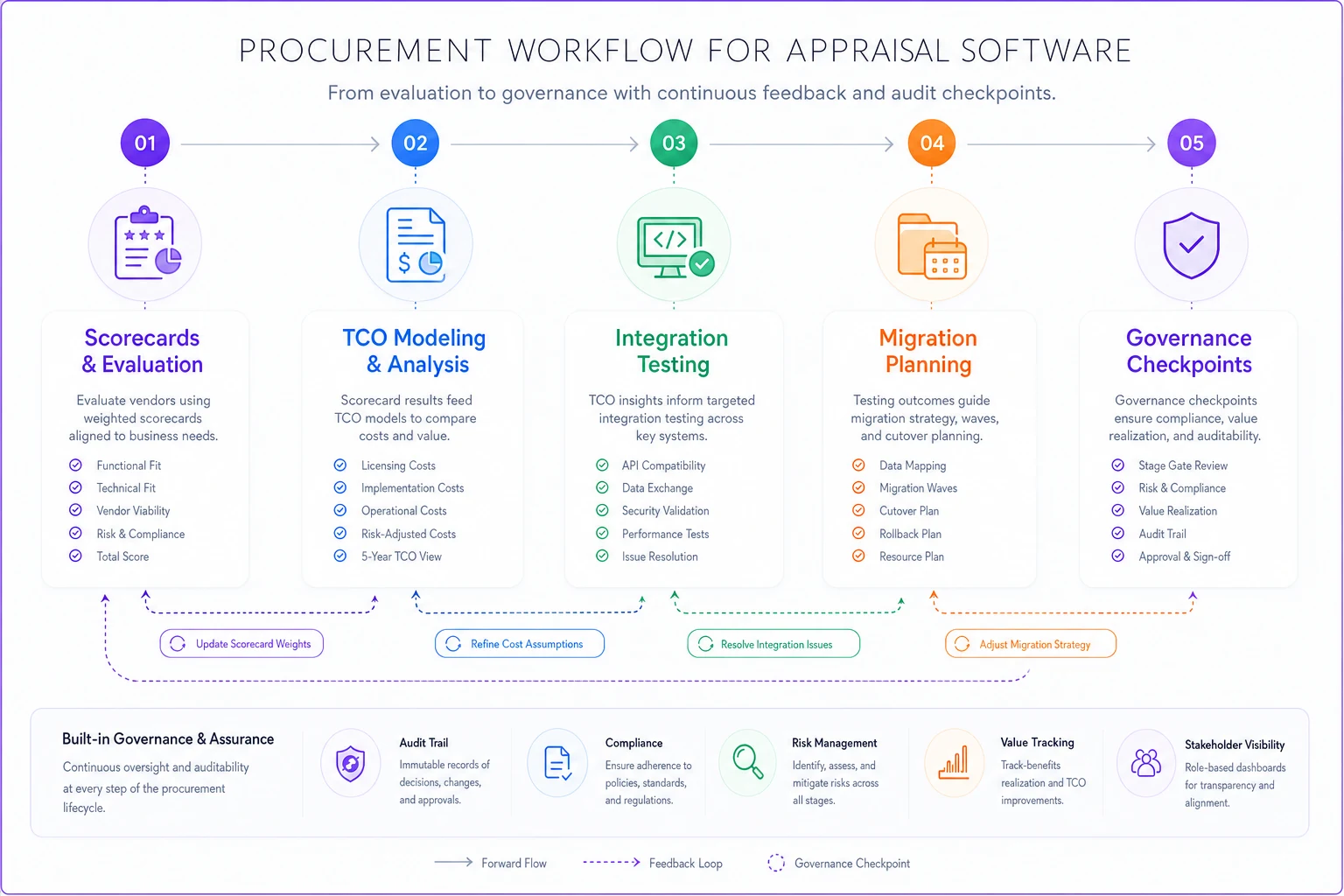
A simple visual of the process helps keep teams aligned.
Firms that treat procurement as a single decision — pick a tool, sign, migrate, hope — keep repeating the same expensive surprise. Firms that treat it as a connected system — score, model, test, migrate carefully, govern continuously — end up making fewer switches and getting more from each one. The software matters less than the process you use to choose it. Get the process right, and even an imperfect tool becomes a manageable, defensible part of how the firm runs.
Ready to elevate your appraisal operations?
Join 500+ appraisal firms using Rateoly to enhance accuracy, save time, and improve client satisfaction.