
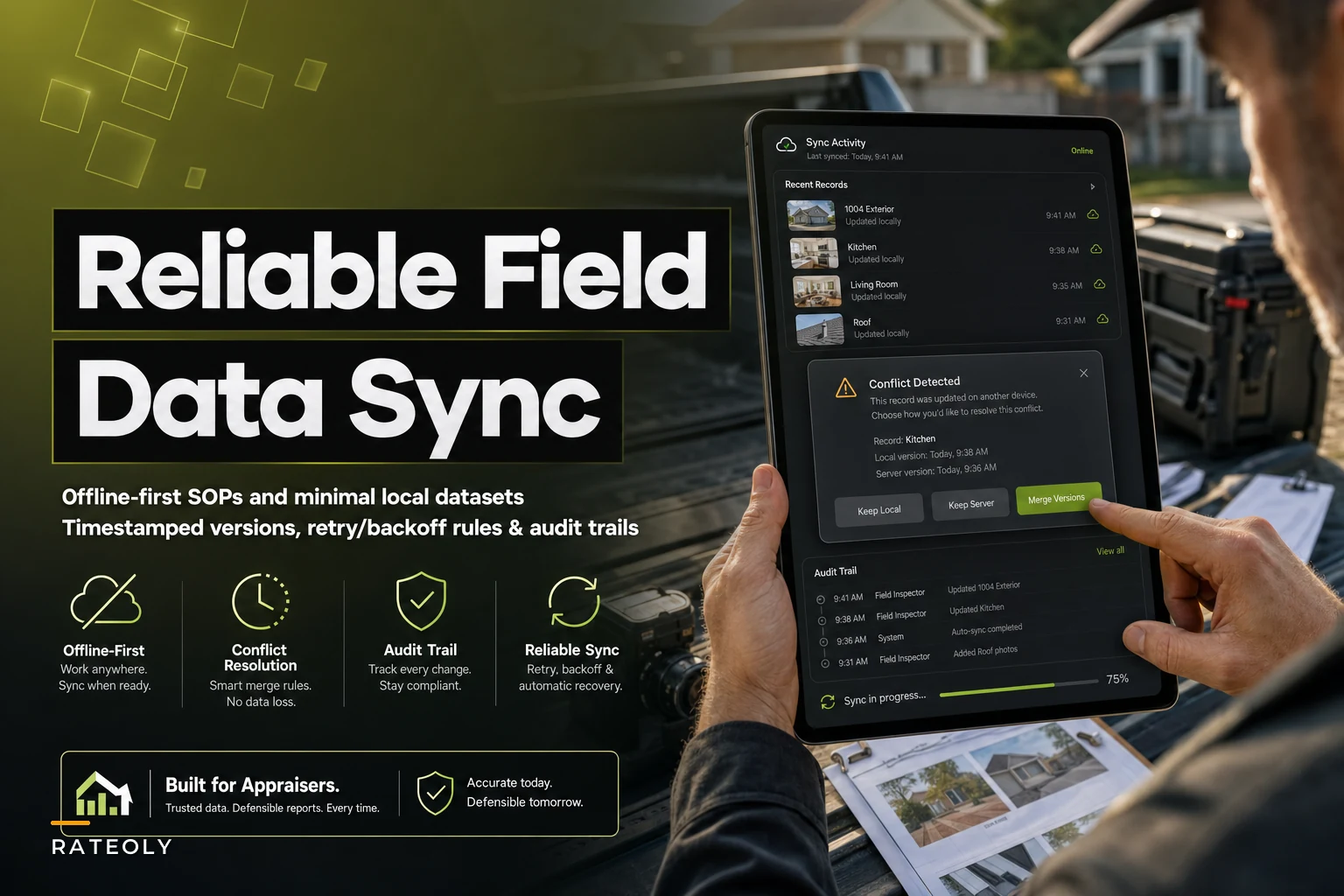

The photos got taken. The sketch got measured. The notes got typed. And then somewhere between the rural property with two bars of signal and the office sync three hours later, half of it either vanished, doubled up, or got quietly overwritten by an autosave nobody asked for.
If you've done field inspections for any length of time, you know the exact feeling of opening a file back at the desk and thinking wait, where's the basement note I dictated? This isn't a rare edge case. It's the predictable result of running mobile data collection on infrastructure that assumes a stable connection you frequently don't have.
The fix isn't "get better signal." It's designing your field process to be offline‑first — meaning the phone or tablet is the source of truth until it can safely hand off, and the handoff itself is governed by rules instead of hope. Here's what that actually looks like for appraisal work.
The three ways field data actually goes wrong
Before touching any solution, it helps to name the failure modes precisely, because each one needs a different countermeasure.
Silent data loss. You capture something — a voice memo, a condition note, a photo tag — while the app is trying to sync in the background. The connection drops mid‑write, the app rolls back to its last "clean" state, and your capture is gone. No error message. That's the dangerous part.
Duplicate/conflicting edits. Two things touch the same record. Maybe you edited the subject's GLA on your tablet in the field, and your assistant corrected it in the office from the order sheet an hour earlier. When they merge, one silently wins. Usually the wrong one.
Version ambiguity. You end up with Smithfinal.pdf, Smithfinalv2.pdf, and SmithFINALusethis.pdf, plus a field sketch that may or may not reflect the last measurement correction. Nobody can prove which condition photo matches which inspection pass.
A typical example: an appraiser does a 1004 on a property 40 minutes outside town. They dictate roughly a dozen condition notes on-site. Cell coverage is spotty, the app buffers. On the drive back it hits a stretch of signal, tries to sync, chokes on a large photo upload, and the app's conflict handler — set to "server wins" by default — quietly replaces the local notes with an older cloud copy from when the order was first assigned. Four notes gone. Nobody notices until the report's half written.
Start with a minimal local dataset (not a mirror of everything)
The instinct is to sync the entire file down to the device so you have "everything." That's actually the root of most sync pain. The more data lives locally and remotely, the more surface area there is for conflicts.
Manage every appraisal with confidence and clarity.
Rateoly helps you coordinate inspections, generate reports, and communicate seamlessly with clients.
- Comprehensive appraisal tracking
- Automated client notifications
- Integrated scheduling & report management
No credit card required
-
Subject identifiers (address, order number, assignment type)
-
The blank or partially-filled inspection form
-
Prior sketch (read‑only reference, if updating)
-
The photo capture module
-
A local scratchpad for notes and voice memos
Everything else — comps, market data, prior versions of the report — stays server-side. The inspector doesn't need the comp grid on the driveway, and keeping it off the device means there's nothing to accidentally overwrite when they sync back.
One thing most people miss: a smaller local dataset isn't just about storage or speed. It shrinks the conflict window. If the tablet only holds the inspection form and photos, the only records that can ever conflict are inspection records. You've eliminated an entire category of "how did the comp adjustment get reverted" mysteries before they happen.
Timestamp and version stamps: make every capture self-describing
Every field record should carry its own timestamp and a version stamp at the moment of capture, on the device, before it ever tries to sync.
Not a server timestamp assigned on upload. A device-side capture time. Because when a conflict happens, the only way to resolve it intelligently is to know which edit actually came later in real time — and server upload order tells you nothing about that. The note you dictated last might upload first.
A workable stamping scheme for each record:
| Field | What it captures | Why it matters |
|---|---|---|
captured_at | Device local time of the edit | True chronology for conflict resolution |
device_id | Which device made the edit | Traces which inspector/tablet |
record_version | Incrementing number per record | Detects whether you're editing a stale copy |
sync_status | pending / synced / conflicted | Surfaces what hasn't safely landed |
origin | field vs office | Lets rules favor field truth on condition data |
That origin field is more useful than it looks. For condition and measurement data, the field capture should almost always win a conflict — the person standing in the house knows more than the person reading the order sheet. For administrative fields like client contact, fee, or due date, the office copy usually should. Your conflict rules can lean on origin instead of guessing.
Conflict resolution: stop auto-merging, start surfacing
The single worst default in most mobile tools is silent conflict resolution. "Last write wins," "server wins," "client wins" — all of them resolve conflicts by throwing data away without telling anyone. For appraisal work, where a lost condition note can undermine a defensible value, that's not acceptable.
The pattern that actually protects you is a surface-and-choose UI. When two versions of a record disagree, don't merge. Show both.
A clean conflict-resolution screen shows:
-
The field value and the office value side by side
-
Each one's
captured_attimestamp andorigin -
A one-line reason it flagged ("GLA differs
2,140 vs 2,096")
-
Three buttons
Keep field, Keep office, Keep both (as a note)
"Keep both" matters more than people expect. Often the right answer isn't picking a winner — it's recording that there was a discrepancy and why it got resolved a certain way. That note becomes part of your defensibility later.
Worth borrowing from some of the more thoughtful tools out there: default the highlighted button based on field type. On condition and measurement records, pre-highlight "Keep field." On admin records, pre-highlight "Keep office." The reviewer can still override, but the safe choice is one tap and the risky choice takes a deliberate second tap. Small friction in the right place prevents most bad merges.
Default the highlighted choice based on field type so one tap selects the safe option and reviewers only intervene when necessary.
When silent merging is actually fine
Not everything needs a human decision. Purely additive data — a new photo, a new note that doesn't touch an existing one — has no conflict. Just append it. Reserve the surface-and-choose flow for records where two edits genuinely disagree on the same field. Flagging every append as a "conflict" trains people to click through the screens without reading, which defeats the whole point.
Retry and backoff: how the sync should behave in a dead zone
The sync behavior itself needs rules, or it burns your battery, corrupts uploads, and drains data. The goal is patient, safe retries — not hammering a weak connection until something breaks mid-write.
-
Queue everything locally first. Nothing syncs until it's written to durable local storage. If the app crashes, the queue survives.
-
Attempt sync, then back off exponentially on failure. Retry after ~30 seconds, then ~1 minute, ~2, ~4, capping around 5–10 minutes. Don't retry every 3 seconds — that's how you cook a battery in the field.
-
Upload small records before large ones. Notes and form fields are tiny and matter most. Push them first; let the 40MB photo batch go last so a failed photo upload never blocks a critical note.
-
Make uploads atomic per record. A record is either fully synced or still pending — never half. This is what prevents the "note got cut off mid-sync" loss.
-
Never let a sync retry overwrite a newer local edit. If the inspector edited a record while it was queued, the newer local version wins over the stale queued one. Check
record_versionbefore sending.
That last rule is the one people forget, and it's the source of the classic "I fixed it in the field and it un-fixed itself" bug. The queued edit from ten minutes ago finally uploads and clobbers the correction you made five minutes ago. Version-checking before send stops it cold.
Here's a quick diagram of a safe retry/backoff sync workflow.
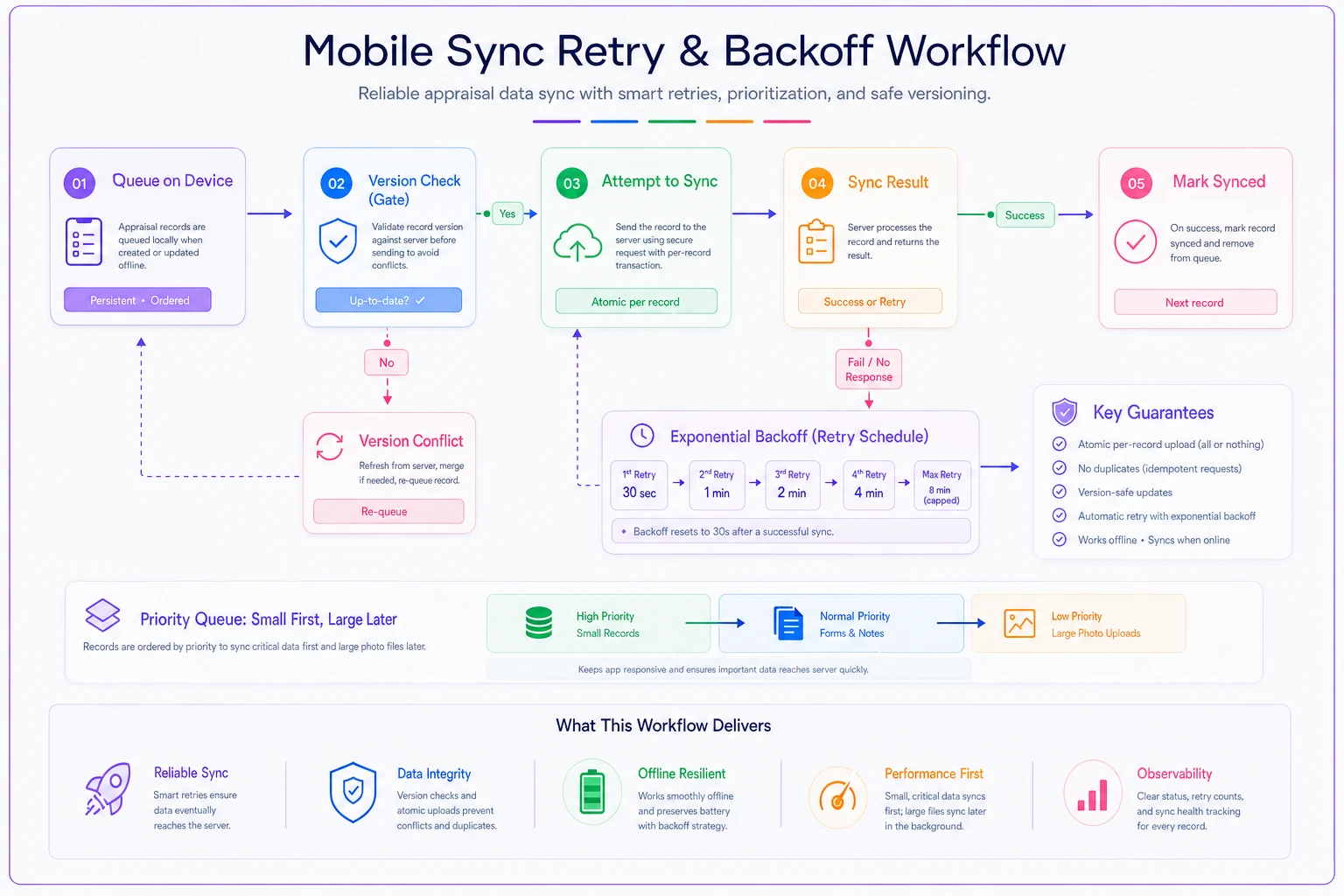
This illustrates prioritizing small critical records, how exponential backoff spreads retries, and the version check that prevents stale queued edits from overwriting newer local edits.
The evidence-integrity audit trail
Everything above is about not losing data. This part is about being able to prove what happened to it — which, in appraisal work, is its own form of protection.
-
Capture events — what was captured, when, on which device
-
Sync events — when each record left the device and landed server-side
-
Conflict events — what conflicted, what the two values were, who resolved it and how
-
Photo lineage — which images came from which inspection pass, with their original capture metadata intact
That last point ties directly into your photo discipline. If your images already follow consistent field photo standards with proper naming and metadata, the audit trail practically builds itself — the metadata is already trustworthy, so linking each photo to its inspection timestamp is trivial. When photos arrive with stripped or inconsistent metadata, no audit trail can retroactively fix that.
The point of the trail isn't bureaucracy. It's that when a review comes back questioning a condition rating six months later, you can show exactly when the note was captured, that it came from the field, and that no silent overwrite touched it. That's a very different conversation than "I'm pretty sure I saw water damage."
A quick field-reliability checklist
Before you trust any mobile workflow with a real assignment, run it against this:
-
- [ ] Can I capture notes and photos with the device in airplane mode, and does it survive an app restart?
-
- [ ] Does every record carry a device-side capture timestamp?
-
- [ ] When two edits conflict, does the system show me both instead of picking one silently?
-
- [ ] Do small records (notes, form fields) sync before large photo batches?
-
- [ ] Does a queued edit ever overwrite a newer local edit? (It shouldn't.)
-
- [ ] Can I trace any photo back to its inspection pass and original metadata?
-
- [ ] Is there a log of who resolved each conflict and how?
If you can't check all seven, you have a data-loss incident waiting for its moment — usually on the highest-value, most-scrutinized file you'll do that quarter.
A real scenario
A three-appraiser shop doing a mix of suburban and semi-rural work was losing field notes on maybe one in fifteen inspections — enough that two of the three appraisers had quietly started re-typing everything into a paper pad "just in case," then keying it in again at the office. Somewhere between 15 and 20 minutes of duplicate work per file, plus the occasional full rewrite when notes vanished entirely.
They didn't buy anything new at first. They changed three things: shrank the local dataset to just the inspection form and photos, added device-side timestamps to every note, and switched the conflict setting from "server wins" to a surface-and-choose prompt. Silent losses basically stopped — from a handful a month down to none over the following couple of months. The paper-pad habit faded because people started trusting the tablet again. The duplicate keying disappeared, which quietly gave back a few hours a week per appraiser.
Nothing dramatic on paper. But field data you can trust changes how the whole desk-side process feels — less second-guessing, fewer "did I actually note that?" moments, cleaner files at review.
Where tooling fits (and where it doesn't)
You can implement a lot of this discipline manually — capture timestamps in a naming convention, keep a change log, be strict about sync order. It works, but it leans hard on people remembering to do it under time pressure, which is exactly when discipline slips.
This is one of those areas where the right platform earns its keep by making the safe path the default one: buffering captures locally, stamping records automatically, surfacing conflicts instead of resolving them silently, and keeping the audit trail without anyone thinking about it. It's the same logic behind building an automation inventory with compliance guardrails — you automate the error-prone parts precisely because those are the parts humans forget when busy. The judgment stays with the appraiser; the bookkeeping of what-happened-when moves off their plate.
What to avoid is treating any tool as a reason to stop thinking about these rules. A platform can enforce timestamps and conflict prompts, but you still decide whether field or office wins on a given record, what belongs in the minimal local set, and how aggressive the retry backoff should be. Those are operational choices, not settings someone else can make for you.
The bottom line
Field data reliability comes down to a few unglamorous habits: keep the local dataset small so there's less to conflict, stamp every capture so you know the real order of events, refuse to merge conflicts silently, retry patiently instead of aggressively, and keep a trail you can actually defend.
The appraisers who get burned by offline sync problems aren't careless — they're usually the ones trusting default settings that were designed for stable-connection apps, not for someone standing in a basement with no signal dictating the one note that ends up mattering most. Fix the defaults, and the field stops being the weakest link in your file.
Ready to elevate your appraisal operations?
Join 500+ appraisal firms using Rateoly to enhance accuracy, save time, and improve client satisfaction.